Personal
One PC
$59.99/year
Equivalent to $5/month
- Approval required for every new connection
- Approval by a Trusted Guardian, or by you
- Whitelist and Blocked IPs
- Guardian Story
- 1 PC
- 14-day free trial
Xcelcor Guardian refuses every new remote connection by default. To get in, somebody has to approve it — and by default that somebody is a person you trust, asked by email, on a device the caller has no way to reach. So a caller who has already talked their way onto the phone still doesn't get in.
14 days free · No credit card · Plans from $59.99/year
Windows 10 & 11
You're protected
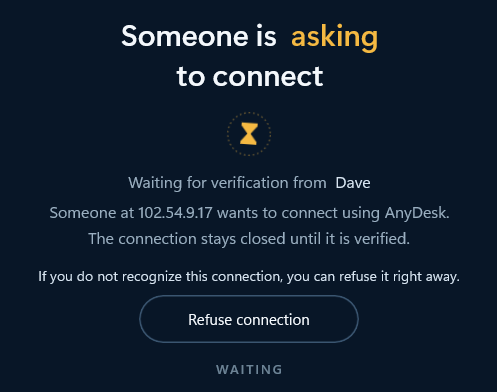
| Asking to connect | 102.54.9.17 |
| Using | AnyDesk |
| Approval | Dave |
Held — nothing connects until Dave approves
This is the Guardian window when a stranger asks to connect. This page is not scanning your computer.
Signed Windows application · Works alongside your antivirus · Refuses new connections by default
Scammers get people to install real remote-support tools. The file isn't malware, so a virus scan stays quiet. The problem is the person on the other end, and whether anybody agreed to let them in.
| Traditional protection | Guardian |
|---|---|
| “Is this file malicious?” | “Did anyone approve this connection?” |
| Malware, ransomware, viruses | Unapproved remote access, and what happens after it's approved |
| Decides on its own, silently | A named person decides, on purpose |
| Keep it installed | Use alongside Guardian |
One setting decides who holds the key, and there are only two honest answers: somebody else, or you. The difference is not convenience. It is whether the person approving is the same person the scammer is talking to.
A parent, a partner, anyone whose PC you look after.
Survives a live scam call.
When there is nobody sensible to nominate. Two ways, and the same limit.
Stops strangers, automated attempts, and anyone controlling the PC. Not a determined live call.
| What it stops | Someone else approves | You approve |
|---|---|---|
| A stranger connecting while nobody is at the PC | Stopped | Stopped |
| Repeated automated attempts on the same address | Stopped | Stopped |
| Somebody controlling the PC approving their own connection | Stopped | Stopped |
| A caller talking the person at the PC into approving | Stopped | Not reliably |
Whichever you pick, the setting lives on this website, not in the app — so someone who is already controlling the PC cannot switch it off.
Yes. That is the whole technique, and it is why asking the victim to make the decision does not work.
So Guardian moves the decision somewhere the caller cannot reach. In the default setting, the person at the keyboard has no approve button at all. The request goes to you, with the address and the time, in an email and a dashboard the caller has no access to.
It is also why approving for yourself is the convenience option rather than the headline. We've closed the part of it that can be closed: an approval link will not open on the machine the connection is destined for, so somebody who already controls that PC cannot wave their own session through, even with your mailbox sitting open on it. What no mechanism closes is you being talked round — because you are the one on the call. A second person cannot be talked into anything, since they are not on it.
A connection was refused
Someone at 102.54.9.17 asked to connect to this computer using AnyDesk at 2:14pm.
Guardian asked Dave. Nobody approved it.
The session was dropped before it started.
Inbound remote-control session from 102.54.9.17 refused at the connection stage. Approval mode: Trusted Guardian. No approval token presented. Failure 2 of 5 for this address.
Refusing a connection is not the end of it. Guardian counts the failures per address.
When the same address has been dropped five times, Guardian moves it to Blocked IPs. It stops asking you, and it stops asking your Trusted Guardian. That address simply cannot reach the PC any more.
Approve a technician once for a single session, or add their address to your whitelist so the next visit goes straight through. Guardian is a door with a lock, not a wall.
Once a session is allowed in, Guardian keeps watching it. Approval gets someone through the door. It does not stop Guardian looking at what they do next.
If an approved session starts transferring installers and reaching for administrator rights, Guardian can end it and tell you why — in the same plain language it uses for a refusal.
Name yourself as their Trusted Guardian. Every request to connect to their PC comes to you first.
Mom's PC
Someone is asking to connect. Waiting for approval.
Email · Xcelcor Guardian
Approve a connection to Mom's PC?
102.54.9.17 · AnyDesk · 2:14pm
Allow once · Always allow · Refuse
No screen viewing. No passwords. No personal files. You approve connections, not her life.
$2.13 billion
reported lost to tech/customer-support scams in the U.S. in 2025.
47,794 reported incidents
Source: FBI IC3, 2025 Internet Crime Report. Tech/Customer Support losses were $2,134,675,818.
These scams rely on persuading a person, not on defeating software. That is the moment Guardian takes the decision away from them.
| Guardian needs | Guardian does not need |
|---|---|
| Remote connection attempts and their addresses | Your personal documents |
| Whether a connection was approved, and by whom | Your photos |
| Activity inside an approved session | Your passwords |
| Installation and security events | Continuous screen recording |
| Minimal information required for approval requests | Selling your browsing history |
| Screen recording | Off |
| Documents | Not collected |
| Photos | Not collected |
| Passwords | Not collected |
| Status | Protected |
Guardian is new. We won't pretend otherwise. Here's exactly what you can verify today.
Annual is the default. Monthly stays plainly available.
One PC
$59.99/year
Equivalent to $5/month
Best for parents, partners, and households
$99.99/year
Less than $2/week for your household
14-day free trial. No credit card required. Cancel anytime.
30-day money-back guarantee on annual subscriptions.
Keep the remote support your company runs on, and require approval for every session that isn't on the list.
Who may approve, for which machines.
Address, time, decision, approver.
Your technicians pass. Nobody else does.
From $4/device/month
Not in the default setting. She has no approve button — the request goes to you, by email and in your dashboard. The caller has no way to reach either. That is the reason approval sits with a second person rather than with whoever is being talked to.
Then nothing connects. Guardian refuses by default, so a missed request is a refused request. The failure costs you a phone call later; the alternative costs a lot more.
Who may approve a connection is set on this website, behind your account — not in the app on the PC. Someone at the keyboard, or someone controlling it remotely, cannot change that setting.
No. Approve their connection once for a single session, or add their address to the whitelist so the next visit goes straight through. Guardian is not a ban on remote support.
In PIN mode, Guardian holds the connection and spends those 30 seconds telling the person exactly what they are about to hand over. If no PIN is entered, or the wrong one is, the session is dropped. It is a deliberate pause in a conversation designed to rush people.
You set it in your account on this website. It is never displayed in the Guardian app, so somebody watching or controlling the screen cannot read it, and cannot reset it.
When the same address has had a connection dropped five times, Guardian stops asking about it and blocks it outright. You can see and edit that list in your dashboard.
Guardian keeps watching the session. If an approved session starts transferring installers or reaching for administrator rights, Guardian can stop it and explain what happened. Approval gets someone through the door, not a free hand.
No. Guardian is designed to work alongside your existing security software. Antivirus judges files; Guardian judges who is allowed to connect.
No. Guardian does not record your screen. It sees connection attempts, approval decisions, and security-relevant activity inside an approved session.
No. They are asked to approve or refuse a connection, and they are told when something serious happened. They don't see your screen, messages, documents, passwords, or banking information.
The trial lasts 14 days. Because we never took a card, the trial does not turn into a surprise charge. Protection state changes clearly, and you can choose Personal or Family if you want it to continue.
Yes. Cancellation is a straight path, not a maze.
Yes. Start Family, send them an installation link, and their PC shows up in your dashboard after they install Guardian. Approval requests for that PC then come to you wherever you are.
14 days · No credit card · Windows 10 & 11