Email bombing attacks: why the inbox flood comes before a fake IT help desk call
The spam flood is the setup. The real attack is the "IT" call or Teams chat that follows and asks for Quick Assist. Here's how to respond.
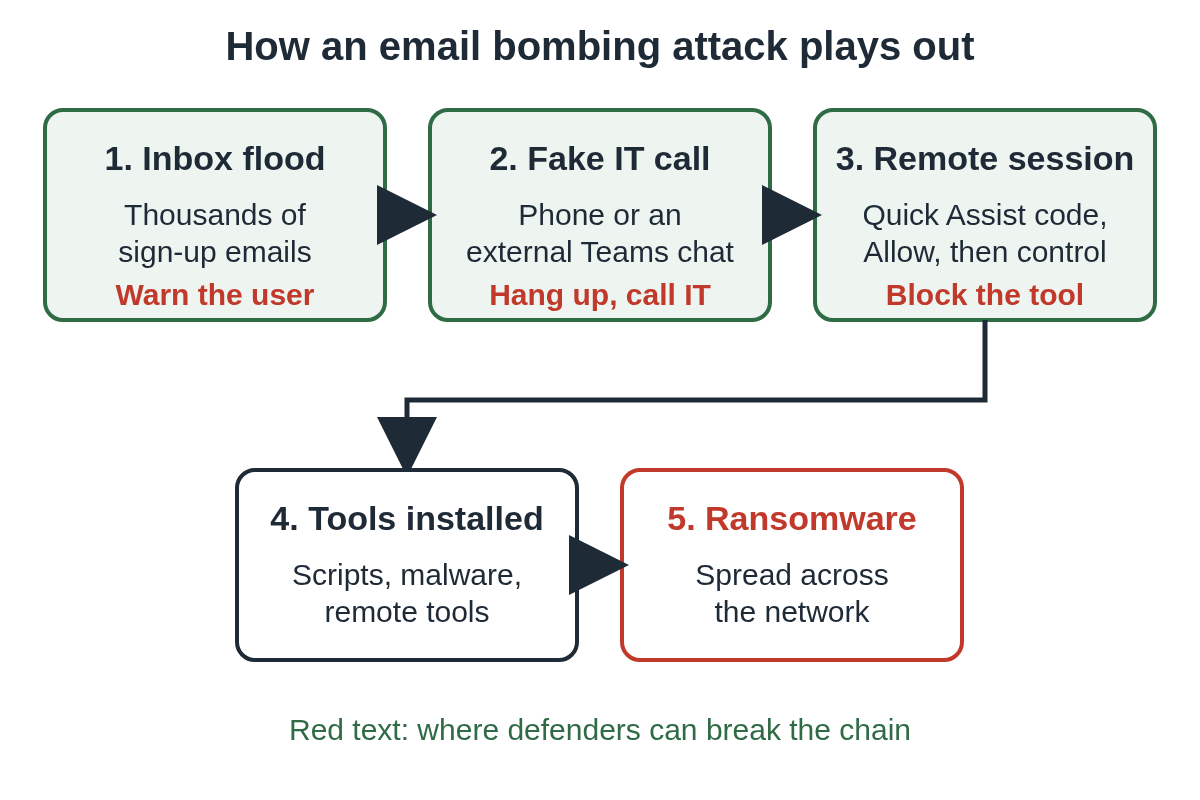
An email bombing attack floods one person's inbox with hundreds or thousands of real sign-up confirmations and newsletters, often within an hour. The flood is rarely the goal. It's the setup for a phone call or Microsoft Teams chat from someone posing as your IT help desk, who offers to fix the spam and asks the user to open Quick Assist or another remote tool.
Microsoft described this pattern in its May 15, 2024 report on Storm-1811, and CISA and the FBI added it to their Black Basta advisory on November 8, 2024. So when a user suddenly gets buried in mail, treat the next "IT" contact they receive as suspect.
In short:
- The flood is made of legitimate mail, so sender rules miss much of it.
- The attack that matters is the help desk impersonation that follows.
- Reach the user before the attacker does, and give them one number to call back.
What is an email bombing attack?
It's a deliberate flood of email aimed at one address. Microsoft calls the version used in these campaigns "link listing": the attacker signs the target's address up to many email subscription services, so the messages come from real companies rather than from the attacker. That makes the flood hard to block by sender, and it leaves the inbox unusable.
The volumes are large. Sophos described incidents with as many as 3,000 messages in less than an hour in its report on two ransomware campaigns.
The attacker doesn't need the user's password for any of this. The sign-up forms are public.
Why do attackers flood an inbox before calling?
The flood gives the fake help desk a reason to exist. The user has a real, visible problem, and when someone from "IT" calls a few minutes later offering to fix it, the call feels like good service.
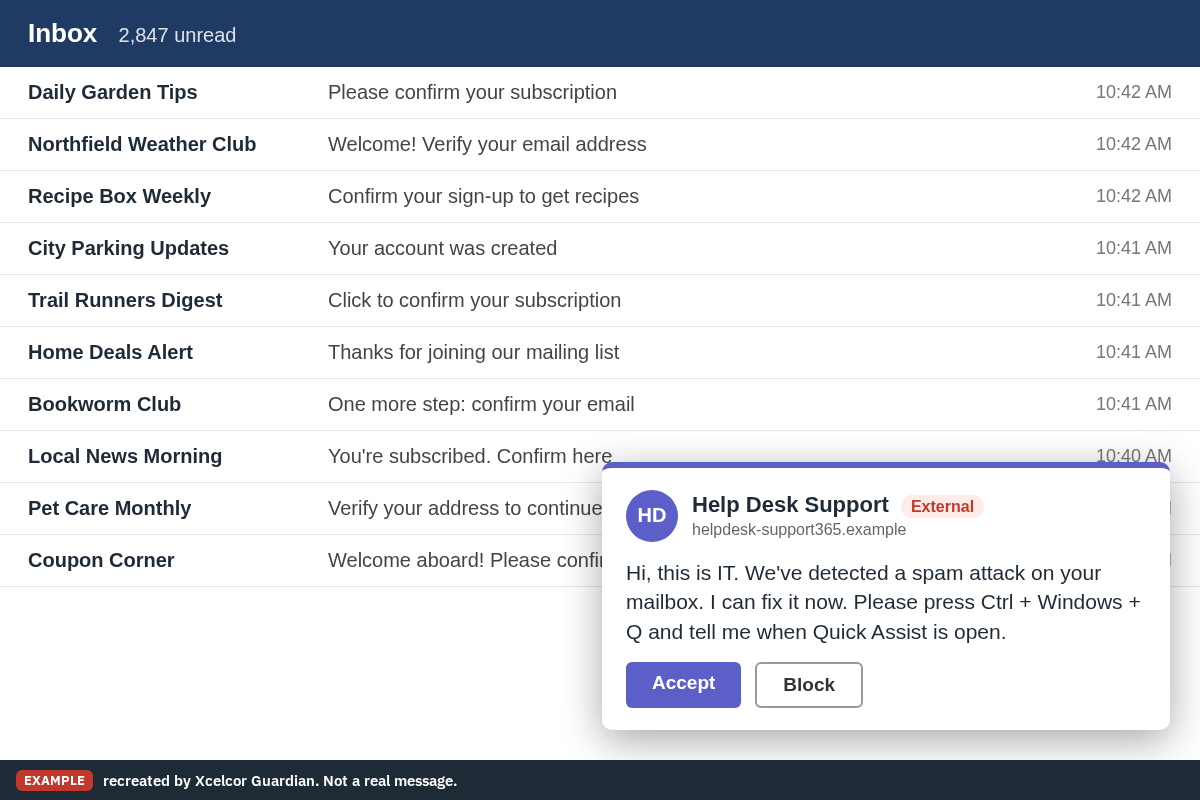
Microsoft's report says the caller then asks the user to press Ctrl + Windows + Q to open Quick Assist, type a security code, click Allow and approve the request for control. From there the attacker has hands-on access. In the cases Microsoft and CISA describe, that access was used to install more tools and, in the end, Black Basta ransomware. CISA's advisory names AnyDesk as well as Quick Assist, and Sophos saw one group use the remote control feature built into Teams.
How does the fake IT call reach your users?
The published reports describe two routes.
- A phone call. Microsoft says Storm-1811 started by calling targets and posing as IT support.
- A Teams chat or call from another tenant. From the end of May 2024, Microsoft saw Storm-1811 contact users through Teams from tenants it had created, with display names such as "Help Desk", "Help Desk IT", "Help Desk Support" and "IT Support". Sophos saw a Teams call from an account named "Help Desk Manager" in an attacker-controlled Microsoft 365 tenant, and pointed out that the default Teams setting lets users from outside domains chat with or call your staff.
Our alert on fake IT support messages in Teams tracks recent reports of the same method. Our post on the Teams IT help desk scam covers what attackers do once the session is open.
Does Microsoft 365 block email bombing?
Partly. In 2025 Microsoft added a mail bombing detection to Exchange Online Protection and Defender for Office 365. Microsoft's announcement says it's available by default in both, and that it sends detected messages to the Junk folder instead of the inbox. Safe senders lists in Outlook are still honored.
Three things to know about it:
- It moves mail to Junk. It doesn't stop the phone call or the Teams chat, and the attacker doesn't need the user to read the flood at all.
- Admins can see it. Detections show as "Mail bombing" in Threat Explorer, the Email entity page and Advanced Hunting. You can build a custom detection rule on
EmailEventswhereDetectionMethodscontains "Mail bombing", and send the alert straight to the help desk. - In a reply under the announcement, Microsoft said the detection depends on Enhanced Filtering for Connectors. Check that setting if your mail passes through another filtering service before it reaches Microsoft 365.
How to respond to an email bombing attack
When the flood starts, assume the call is coming. Speed matters more than cleaning up the inbox.
- Reach the user first, on a channel you trust: their desk phone, a visit, or an internal Teams chat from a known account. Tell them IT won't contact them to fix this or ask for remote access, and that anyone who does should get hung up on.
- Check their recent external contacts. Look for Teams chats or calls from outside tenants to that user in the same window.
- Watch the endpoint. Look for Quick Assist, AnyDesk or any other remote tool starting on their PC around the time of the flood.
- Leave the flood to the filters. Don't ask the user to click unsubscribe links in hundreds of messages. Some may not come from the companies they claim to.
- If a session was already allowed, treat it as an intrusion. Disconnect the PC from the network, rotate credentials reachable from it, and look for new remote tools, scheduled tasks and installs. Our Teams help desk scam post lists what Microsoft saw attackers leave behind. For a personal machine, our two-minute checklist covers the first steps.
How to stop the call from working next time
These come from Microsoft's Storm-1811 report and CISA's advisory, plus the settings our other IT posts walk through.
- Restrict Teams external access. In the Teams admin center, allow only the external domains you work with. If you can't, train staff to check the External label before replying, as Microsoft recommends.
- Block or remove Quick Assist where you don't use it. Microsoft points out that Quick Assist is installed by default on Windows 11 and recommends blocking or uninstalling it if you use Remote Help or another tool. Our post on disabling Quick Assist in Intune covers both methods and the catch with Remote Help.
- Control every remote tool, not just Quick Assist. CISA's advisory names AnyDesk too. See how to block unauthorized RMM tools.
- Write down how IT contacts people, and tell staff. Microsoft's advice is to accept a Quick Assist helper only when the user started the contact with IT. One sentence is enough: "If your inbox floods, expect a fake IT call. Hang up and call the help desk."
- Require phishing-resistant MFA through Conditional Access, as Microsoft recommends, so a hijacked session can't easily turn into a hijacked account.
To put this in front of staff, print our one-page notice and fill in your help desk number and how IT contacts people.
Staff notice: if your inbox suddenly floods (PDF)
Our guide to Quick Assist scams explains the same session from the employee's side, and works as a link to send staff.
More posts for admins are on the IT and help desk hub.
Questions people ask
Does an email bombing attack mean my account was hacked?
Not by itself. In the attacks Microsoft describes, the attacker signs your address up to many public subscription services, which needs no password. The danger is the fake IT call or Teams chat that often follows.
Does Microsoft 365 stop email bombing?
Partly. Since 2025, Exchange Online Protection and Defender for Office 365 detect mail bombing by default and send those messages to Junk. That doesn't stop the follow-up call, so the help desk still needs to warn the user.
What should an employee do if IT calls about the spam?
Hang up and call the help desk on the number you already have. Don't open Quick Assist or install anything for someone who contacted you first.
Should the user unsubscribe from all the emails?
No. Let the filters move the flood to Junk and let IT clean up. Clicking hundreds of unsubscribe links wastes time and some messages may not be what they claim.
Sources
- Microsoft Security Blog: Threat actors misusing Quick Assist in social engineering attacks leading to ransomware (May 15, 2024)
- CISA: #StopRansomware: Black Basta (AA24-131A, revised November 8, 2024)
- Microsoft Community Hub: Protection Against Email Bombs with Microsoft Defender for Office 365
- Sophos: Sophos MDR tracks two ransomware campaigns using email bombing, Microsoft Teams vishing
Drafted with AI assistance from public sources, then checked and approved by Dana Cross, Head of Trust & Digital Safety on . See how we work, or tell us about a mistake at support@xcelcor.com.