How to remove your personal information from people search sites, for free
Opt out site by site for free, ask Google to hide your phone and address, and, in California, send one DROP request to every registered data broker.
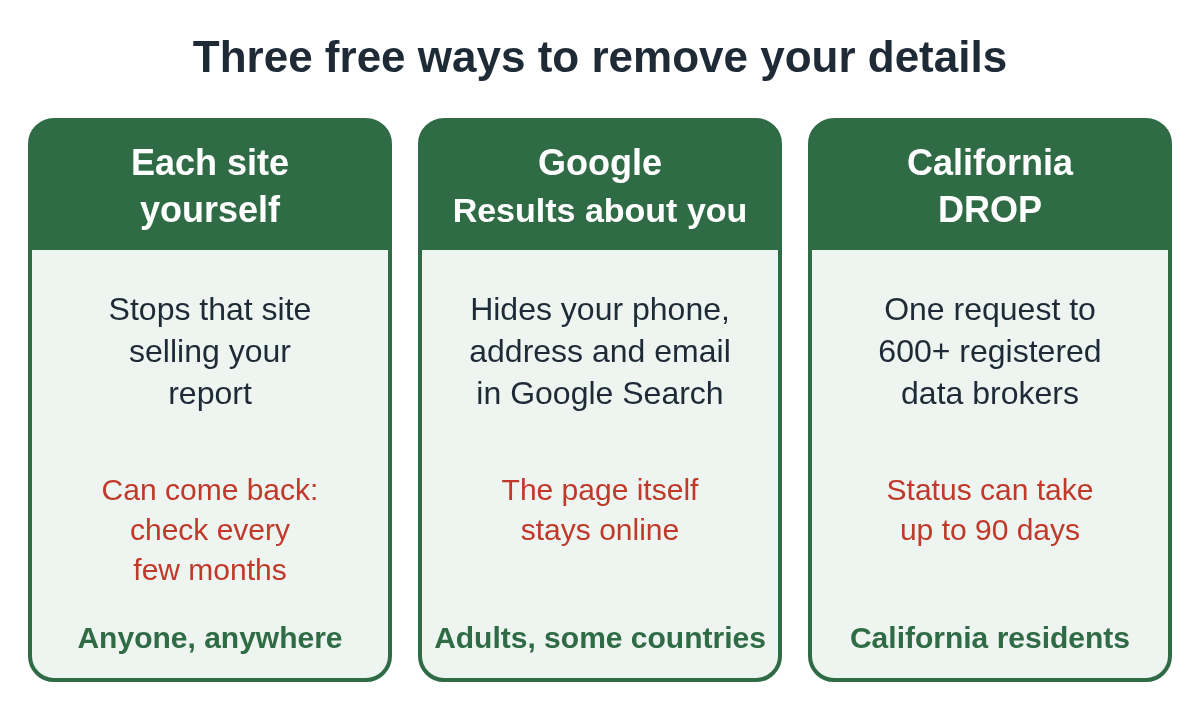
You can remove your details from most people search sites for free: search for yourself on each site, find its opt-out page and ask it to stop selling your report. The FTC says most of these sites have a way to opt out, but you have to do it one site at a time and check back later, because listings can return. If you live in California, one free request through the state's DROP tool now goes to more than 600 registered data brokers at once.
What are people search sites, and where do they get my information?
People search sites (also called people finder sites) collect information about you, put it into a report and sell that report to anyone willing to pay. The FTC calls them a type of data broker. They buy from other data brokers, copy public social media profiles and pull government public records, such as property, voter registration, court, marriage and professional license records.
According to the FTC, a report can include your age and date of birth, other names you've used, current and past addresses, education and job history, court records, and the names and addresses of your family members. Anyone can buy that, including someone planning a scam call. A caller who already knows your street and your son's name sounds far more convincing, which is one reason a family safe word helps.
How do I remove myself from people search sites?
These are the FTC's steps, with a few practical additions of our own.
- Search for yourself. Start with your phone number or home address rather than your name. A common name brings up pages of strangers; a phone number is more likely to lead to your own report.
- Find the opt-out link. Open the report that's yours and look for a link about opting out or removing your information. It's often at the bottom of the page or in the privacy policy. If there isn't one, search the web for the site's name plus "opt out" or "remove my information".
- Follow the steps. Some sites ask you to confirm by email, and the FTC notes that some ask for information to verify who you are.
- Write it down. Note the site, the date, the address of your report and any confirmation number. You'll want this when you check again.
- Repeat on the next site. One site's opt-out doesn't cover the others.
The FTC says that after you opt out, the site will stop selling your existing information. Some details can be removed (like your address or phone number) and some can't (like sex offender status).
Printable log: people search sites you've opted out of (PDF)
What should I give a site when I opt out?
Give only what the form asks for, and nothing that isn't already in the report. A separate email address that you use just for opt-outs keeps the confirmations together and keeps your main inbox out of yet another database. The FTC describes the do-it-yourself route as free, so don't pay a people search site to remove its own report about you.
Why does my information come back after I opt out?
Opting out isn't permanent, and the FTC is clear about the limits:
- If your public records change (you move, buy a house or register to vote at a new address), your information could reappear for sale.
- Your details may still show up inside the reports of your relatives, neighbors or associates.
- Opting out doesn't delete public records, so someone could still find them on a government website.
The FTC's advice is to check the sites periodically and send a new opt-out request when anything new shows up. A reminder in your calendar every three or four months, plus your notes from step 4, makes this a short job.
Can I remove my address and phone number from Google results?
Yes, for some details. Google's Results about you tool lets you ask Google to remove search results that show your phone number, home address or email address. Open it in the Google app by tapping your profile picture and choosing Results about you, or go to myactivity.google.com/results-about-you in a browser. Then choose Get started (or Settings) and enter the details you want Google to look for.
You can turn on notifications, so Google tells you by email or in the Google app when new results with your details appear. That's a handy early warning that a people search site has listed you again.
Two limits, from Google's own help page (checked November 2026):
- Removing a result from Google Search doesn't remove the information from the website. The page still exists; it's just harder to find. That's why you still need the site-by-site opt-outs.
- Google won't remove results from government or educational sites, or from newspapers. Google also says some of these features are still rolling out, for adults in certain countries.
How do I use California's DROP to delete my data?
If you're a California resident, the Delete Request and Opt-out Platform (DROP) from the California Privacy Protection Agency (CalPrivacy) lets you send one deletion request to every registered data broker. It's free, and the state says it will never charge for it. Start at privacy.ca.gov/drop.
- Confirm you're a California resident. This goes through the California Identity Gateway. You don't need to make an account there, and DROP says it doesn't keep that information. You can also sign in with Login.gov if you already have an account.
- Create your profile. You choose how much to add. CalPrivacy says optional details, such as your phone's advertising ID or your car's VIN, can help brokers match your records.
- Submit your request. CalPrivacy says it takes less than 10 minutes, and you only need to do it once.
Since August 1, 2026, data brokers have had to check DROP at least once every 45 days and delete matching information on a rolling 45-day basis. Status updates can take up to 90 days to appear. You check them with your 8-digit DROP ID, which CalPrivacy asks you not to share. Each broker's status will say one of these:
| Status | What it means |
|---|---|
| Record deleted | The broker found you and deleted information it isn't allowed to keep. |
| Record exempted | The broker found you but is allowed by law to keep the information. |
| Record opted out of sale | The broker matched more than one person, so it can't sell or share the data but may still hold it. |
| Record not found | The broker had nothing on you, or couldn't match you. |
| Pending | The broker hasn't processed your request yet. |
If you don't live in California, use the site-by-site steps and Google's tool above.
Should I pay a service to remove my information?
You don't have to. Everything above is free. If you'd rather pay someone to do it, the FTC suggests asking three questions before you sign up:
- How many people search sites does it cover?
- Will it give you a list of the sites it opted you out of?
- How often does it scan those sites again and remove information that has come back?
We don't recommend particular services. Whichever route you take, search for your phone number once in a while to see what's still out there.
How do I remove an elderly parent's information?
A report that lists an older parent's address alongside their children's names gives a scam caller a lot to work with. DROP lets a family member send a request for an elderly relative who lives in California. For the site-by-site steps, sit down together and do the first few sites as a team, using an email address your parent can check. Our guides to the signs an elderly parent is being scammed and how to talk to elderly parents about scams help with the conversation.
If you're trying to keep your address from someone who means you harm, the FTC points to a guide from the National Network to End Domestic Violence for extra steps.
More on keeping your details private is on our privacy topic page.
Questions people ask
Is it free to remove myself from people search sites?
Yes. The FTC says you can opt out of each site yourself for free. Paid services exist, but you don't need one. California's DROP tool is also free.
Does opting out delete my public records?
No. Opting out stops a people search site selling its report, but property, court and voter records stay on government websites, and your details can come back if those records change.
Can I remove my elderly parent's information?
In California, DROP lets a family member send a request for an elderly relative. Elsewhere, help your parent do the site-by-site opt-outs using an email address they can check.
How long does a DROP request take?
Data brokers must check DROP at least every 45 days from August 1, 2026. CalPrivacy says status updates can take up to 90 days to show.
Sources
- FTC: What To Know About People Search Sites That Sell Your Information
- California Privacy Protection Agency: Delete Request and Opt-out Platform (DROP)
- CalPrivacy: DROP data broker deletions, how do they work? (July 10, 2026)
- Google Search Help: Remove results about you with your personal contact info
- Google Search Help: Remove your personal information from Google
Drafted with AI assistance from public sources, then checked and approved by Thomas Whitmore, Head of Threat Intelligence & Security Research on . See how we work, or tell us about a mistake at support@xcelcor.com.
More on Privacy Family and older relatives Scams