Fake virus warning on iPhone: how to get rid of it, and what to do if you called the number
The virus warning is a web page, not Apple. Close the tab, clear Safari's website data, delete any spam calendar, and what to do if you already called.
A virus warning that pops up on your iPhone while you're browsing is fake. It's a web page pretending to be Apple, and you get rid of it by closing the Safari tab without tapping anything on it, then clearing Safari's website data. Don't call any number it shows. If the warnings keep coming back as calendar alerts, you've been subscribed to a spam calendar, and you can delete it in the Calendar app.
We checked these steps against Apple's help pages for iOS 27 (iOS 27.2.1 is the newest release Apple lists in November 2026). The same menus are in iOS 18 and iOS 26. On iOS 17 and earlier, Safari's settings are under Settings, then Safari, with no Apps step.
Is the virus warning on my iPhone real?
No. Apple's own scam advice lists "misleading pop-ups and ads that say your device has a security problem" as a common trick. It says that if a pop-up warns you about security problems or viruses on your device, "don't believe it", and don't call the number. The FTC puts it just as plainly: real security warnings will never ask you to call a phone number.
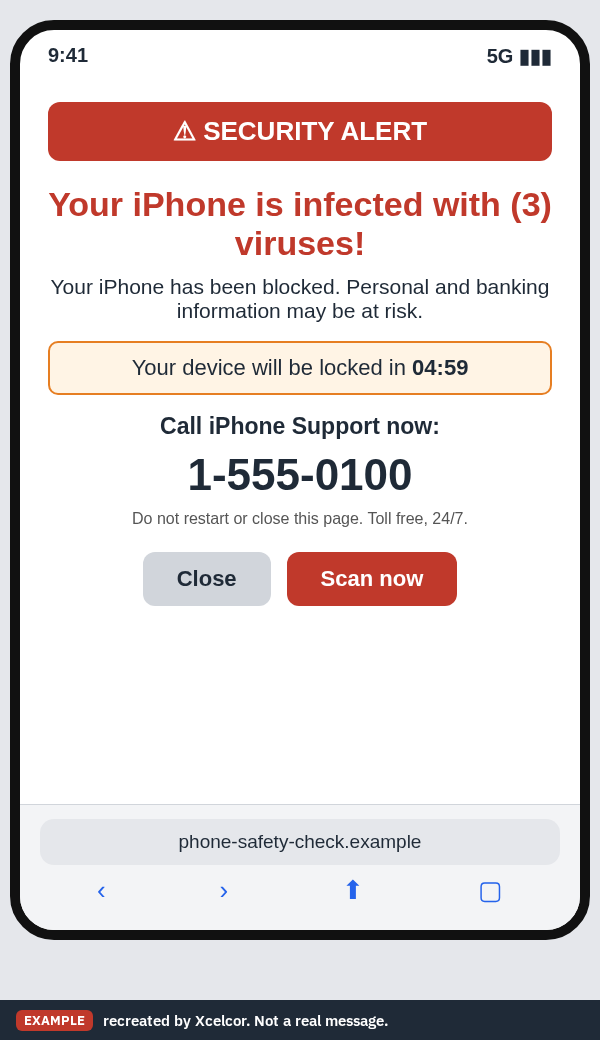
These pages usually say your iPhone is infected, hacked or blocked. Some use Apple's name, a countdown or a loud alarm. The aim is to get you to call, install an app or pay for a fix you don't need. A website can't look inside your phone, so the "scan" it shows is made up. It's the same trick as the fake Microsoft pop-up on Windows PCs, redrawn for a phone screen.
How do I get rid of the fake virus warning?
Don't tap anything inside the warning, including buttons that say Close, Cancel or OK. Apple says some pop-ups have fake buttons that look like a close button, and if you're not sure, close the tab instead.
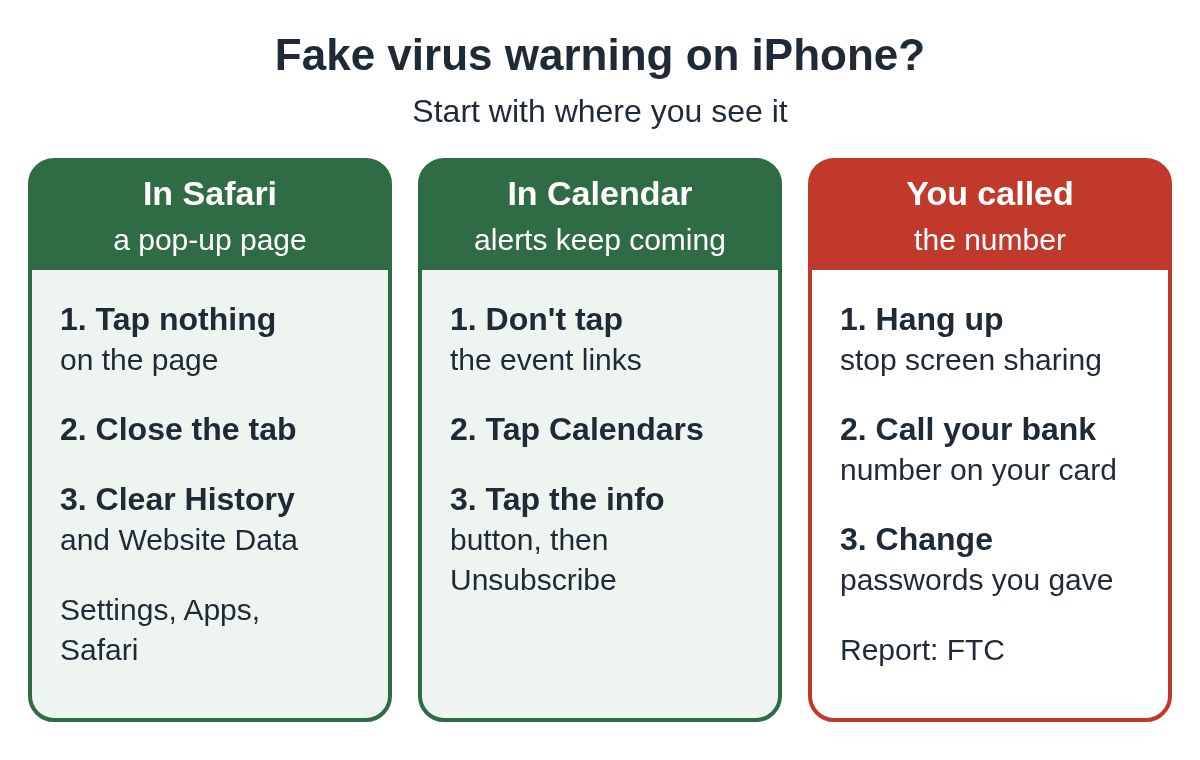
- Close the tab. In Safari, tap the Tabs button, then tap the close button (the X) on the tab with the warning. If you can't tell which tab it is, touch and hold Done and choose Close All Tabs.
- Clear what the site left behind. Open Settings, tap Apps, then tap Safari. Scroll down, tap Clear History and Website Data, choose the timeframe (All History is safest) and tap Clear History. This signs you out of websites, so have your passwords handy.
- If you'd rather keep your browsing history, go to Settings, then Apps, then Safari, then Advanced, then Website Data, and tap Remove All Website Data, then Remove Now.
- Turn on Safari's protections. In Settings, then Apps, then Safari, make sure Block Pop-ups and Fraudulent Website Warning are both on.
- Update your iPhone in Settings, then General, then Software Update. Apple says updates can include improvements that help control pop-ups, as well as security fixes.
If the warning comes straight back when you open Safari, the old tab has reopened. Do step 2 before you open Safari again, and don't go back to the site that showed it.
Why do I keep getting virus alerts in my iPhone calendar?
If the warnings show up as calendar notifications, with event names about viruses or prizes and a link to tap, you've probably been subscribed to a spam calendar. This often happens after tapping a button on one of these pages. Apple's scam page mentions this and says you can simply delete the calendar. Don't tap the links in the events.
Apple's steps for iOS 26 and later:
- Open the Calendar app and tap Calendars.
- Find the calendar you don't recognize and tap the info button next to it.
- Tap Unsubscribe (or Delete Calendar), then tap it again to confirm.
For a single event invitation from someone you don't know, tap the event, tap Report Junk, then tap Delete and Report Junk.
Did the pop-up put a virus on my iPhone?
Seeing the page doesn't mean anything was installed. The warning is a picture drawn by a website, and its claim that it found a virus is invented. What matters is what you did next.
If you only looked at it and closed it, you're done once you've cleared Safari's data. If you tapped Allow or Install on something, check two places:
- Your apps. Delete any app you installed because the page or a caller told you to.
- Profiles. Go to Settings, then General, then VPN & Device Management. Apple's guide says this is where you see installed configuration profiles. If you see one you don't recognize, and no employer or school set up your phone, tap it to see who it's from and remove it. Apple warns that removing a profile also removes its settings, apps and data, so leave a work or school profile alone and ask them first.
I called the number or gave them access. What now?
These calls are designed to sound official, and they catch careful people. What to do depends on what happened.
- Hang up. If they asked you to share your screen, stop sharing.
- If you paid, call your bank or card issuer straight away, using the number on the back of your card. The FTC says to report a bank transfer or Zelle payment to your bank immediately and ask them to reverse it. Our guide on how to get money back after being scammed covers each way of paying, including gift cards.
- If you gave a password, change it and turn on two-factor authentication. Start with your Apple Account and your email.
- If they also got onto a computer, follow our two-minute checklist on that PC.
- Report it to the FTC at ReportFraud.ftc.gov. If you lost money, you can also report it to the FBI at ic3.gov.
Apple says that if someone calls claiming to be Apple Support, you should hang up and contact Apple yourself through its official support channels. Our alert on the fake Apple security alert scam shows how one of these calls played out in October 2026, and the tech support scam guide explains the warning signs.
How to stop fake virus pop-ups on iPhone coming back
- Keep Block Pop-ups and Fraudulent Website Warning turned on in Safari's settings.
- Keep your iPhone on the latest version of iOS.
- If one site keeps showing the warning, stop visiting it.
- Share one simple rule with family: a pop-up with a phone number is never Apple. If you look after a parent's iPhone, show them how to close a tab, since that's the only button they need.
You'll find more iPhone help on the iPhone and iPad topic page.
Questions people ask
Is the virus warning on my iPhone real?
No. Apple says that if a pop-up warns you about security problems or viruses on your device, don't believe it, and don't call the number. Close the Safari tab.
Will clearing Safari history get rid of the pop-up?
Closing the tab gets rid of the page. Clearing history and website data (Settings, then Apps, then Safari) removes what the site left behind. It also signs you out of websites.
Why do I get virus alerts from my Calendar app?
You've probably been subscribed to a spam calendar. In Calendar, tap Calendars, tap the info button next to the one you don't know, and tap Unsubscribe or Delete Calendar.
I called the number. What should I do?
Hang up. If you paid, call your bank or card issuer using the number on your card. Change any password you gave out, delete any app they had you install, and report it at ReportFraud.ftc.gov.
Sources
- Apple Support: Recognize and avoid social engineering schemes including phishing messages, phony support calls, and other scams
- Apple Support: Block pop-up ads and windows in Safari
- Apple Support: Delete your Safari history, cache, and cookies on iPhone
- Apple Support: How to delete calendars and remove events on your iPhone
- Apple Support: Install or remove configuration profiles on iPhone
- Apple Support: About iOS 27 Updates
- FTC: How To Spot, Avoid, and Report Tech Support Scams
- FTC: What To Do if You Were Scammed
Drafted with AI assistance from public sources, then checked and approved by Jake Wilder, Security Awareness & Communications Lead on . See how we work, or tell us about a mistake at support@xcelcor.com.