Is TeamViewer safe? What it lets someone do, and how to spot a scam session
TeamViewer is a real remote desktop app. Whether a session is safe depends on who has your ID and password, and who asked for them.
TeamViewer is safe when you choose who connects. It's a legitimate remote desktop program that IT departments, repair shops and families use to fix computers from a distance, and it isn't a virus. The risk is who gets your TeamViewer ID and password: anyone with both can see your screen and control your computer.
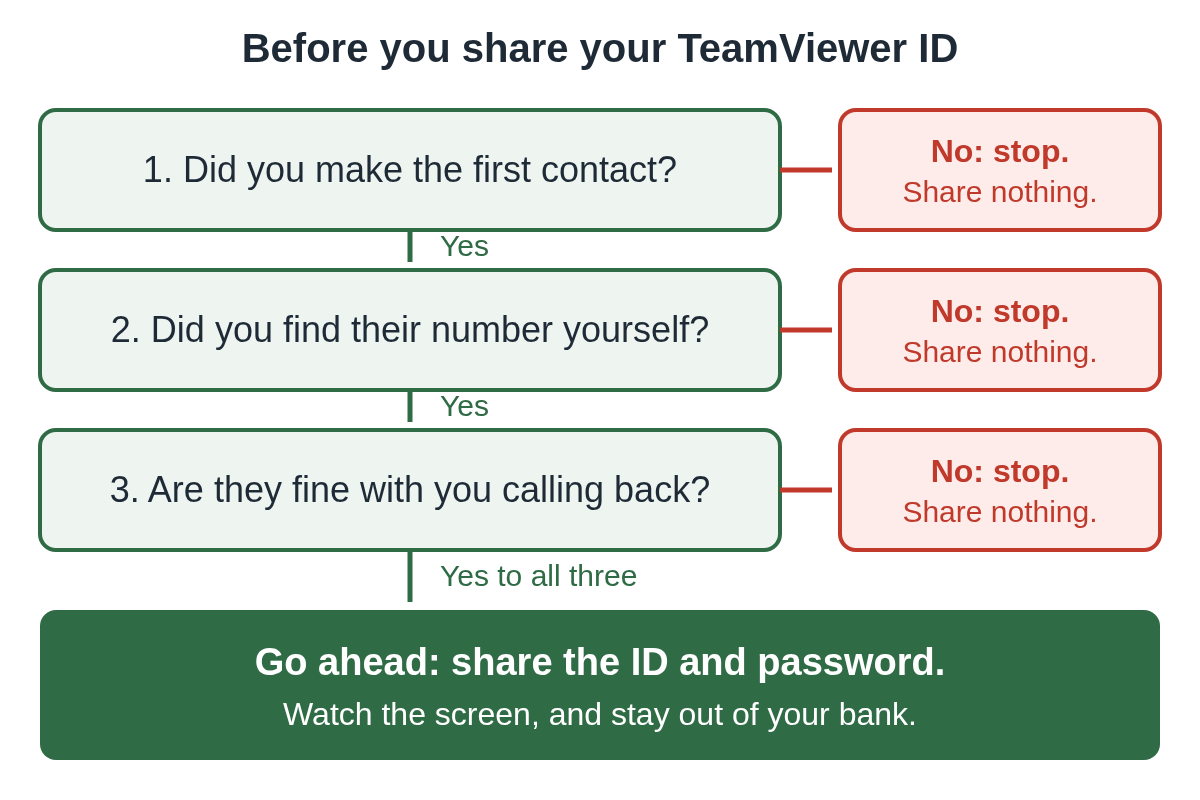
So the better question is usually "is this session safe?" If you called someone you know, it's usually fine. If a pop-up, a text or a stranger on the phone told you to install TeamViewer, it's a scam.
Is TeamViewer legit?
Yes. TeamViewer is a real company that makes remote support software. The same program a scammer asks you to install is the one your nephew or your local repair shop might use.
TeamViewer itself says its software has been misused. Its help pages describe the pattern: criminals phone people, claim the device has malware, and try to sell a fix. The company also says it doesn't offer remote support services of any kind. It only makes the software. So anyone who calls saying they're from TeamViewer and wants to fix your computer isn't from TeamViewer.
How does TeamViewer let someone in?
When you open TeamViewer, it shows your ID and a password. TeamViewer's help pages say this random password is meant for spontaneous support sessions, and that anyone you give your ID and the current password to can connect to your device.
Think of the pair as a house key. Reading them out is the same as handing the key over. Once someone connects, they can move your mouse, type, open programs and see everything on your screen, including your bank if you log in.
Some versions of TeamViewer QuickSupport use a session code instead, then show a window asking you to click Allow. Either way, the code or the click is what lets them in.
Was TeamViewer hacked?
In June 2024, TeamViewer said attackers had gotten into its internal corporate IT network. The company tied the attack to APT29, a group also known as Midnight Blizzard. It said the attack was contained to its corporate network, which is kept separate from the product, and that it found no evidence the product environment, its connection platform or customer data was affected.
That incident isn't how most people lose money with TeamViewer. The everyday danger is much simpler: someone talks you into handing over your ID and password.
When is TeamViewer not safe?
It's not safe when someone else started the conversation. Something alarming happens, a number appears, and the person who answers asks you to download TeamViewer.
The FTC says tech companies don't call, email or text to tell you there's a problem with your computer, and that real security pop-ups never ask you to call a number. Microsoft says the same about its own error and warning messages: they never include a phone number.
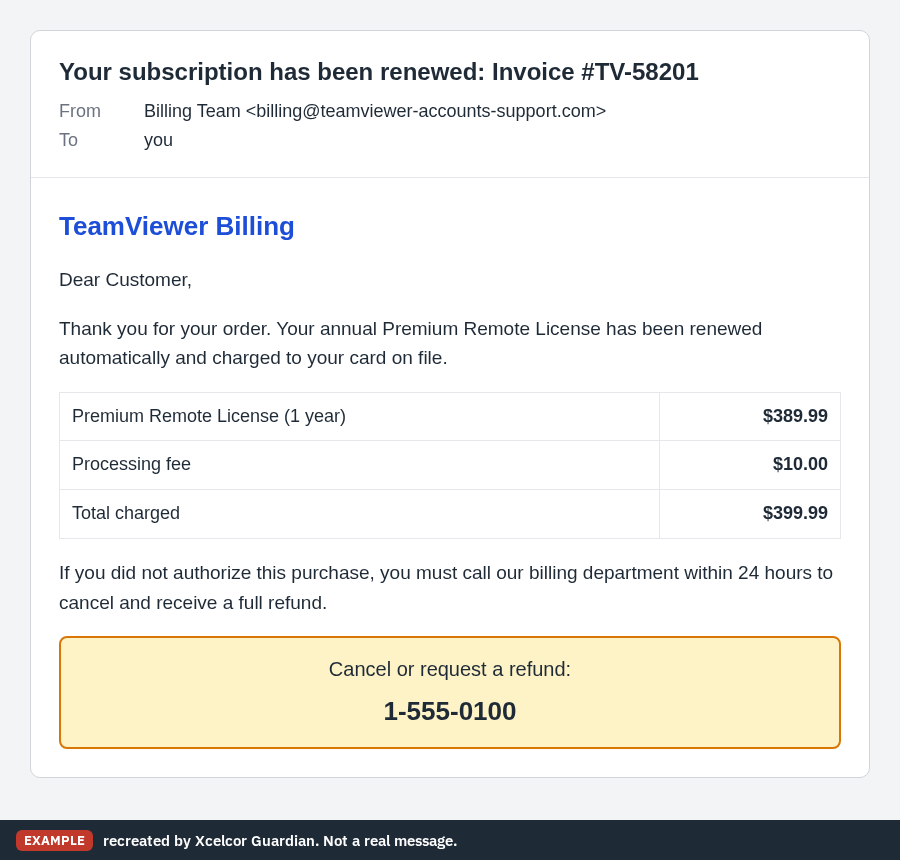
Fake bills are another way in. TeamViewer's community team has warned about invoice emails sent from addresses that look almost like TeamViewer's, and advises checking the sender and contacting TeamViewer support directly if you're unsure. The usual trick is a large "renewal" you never ordered and a number to call to cancel it. This recreation shows what that tends to look like.
Here are the signs that a TeamViewer session isn't safe:
- You didn't start the contact. A pop-up, a call, a text or an email came to you first.
- The person says they're Microsoft, TeamViewer, your bank, Amazon or your internet provider.
- They ask you to read out your TeamViewer ID and password, or to click Allow.
- Once connected, they ask you to log in to your bank or email "to check" something.
- They tell you not to hang up, not to restart, or not to tell anyone.
Is it safe to download TeamViewer?
Installing it doesn't open your computer to anyone on its own. Nobody can connect until they have your ID and the current password, or until you click Allow.
If you need it to get help from someone you trust, type teamviewer.com into your browser yourself rather than following a link from a caller. If you only installed it because a stranger told you to, uninstall it. On Windows 11, open Settings, then Apps, then Installed apps, find TeamViewer and choose Uninstall. On Windows 10 it's under Apps & features.
Can someone use TeamViewer without me knowing?
Not in the normal setup. TeamViewer's help pages say that once the random password changes, a person who had the old one can't get back in until you give them the new one. You can set the password to change after every session, and TeamViewer recommends doing that.
But if a stranger has already been connected, don't assume closing TeamViewer ends it. While they were in, they could have set a permanent password, linked your PC to their own account, or installed a second remote tool. Our guide to TeamViewer scams shows where to look for that.
What to do if a stranger connected through TeamViewer
If someone you don't know is connected right now, disconnect the PC from the internet (unplug the cable or turn off Wi-Fi), then hang up.
After that:
- Call your bank from another phone, using the number on the back of your card.
- Change your email password from a different device.
- Uninstall TeamViewer and anything else the caller told you to install.
Follow our two-minute checklist for the rest, and see what to do after someone remotely accessed your computer for the days after.
You can report it to the FTC at ReportFraud.ftc.gov and to the FBI at ic3.gov. If the caller said they were Microsoft, report it at microsoft.com/reportascam too. TeamViewer takes reports of its software being misused at teamviewer.com/report-a-scam.
How to use TeamViewer safely
TeamViewer is a fine way to get help from a relative or a technician you chose. A few habits keep it that way:
- Only share your ID and password with someone you contacted first, on a number you found yourself.
- Never read them out to someone who called you, or whose number came from a pop-up or an email.
- Set the random password to change after each session.
- Don't log in to your bank or email while someone else is connected.
- If you don't use it, uninstall it.
If you'd rather nobody could connect without you, see how to block AnyDesk and TeamViewer requests on a home PC. The same thinking applies to other tools, as in our post on whether AnyDesk is safe, and you can browse more posts about remote access.
Questions people ask
Is TeamViewer a virus?
No. It's a real remote desktop program. It becomes dangerous only when a stranger gets your TeamViewer ID and password, or you click Allow for them.
Does TeamViewer call people to fix their computer?
No. TeamViewer says it doesn't offer remote support services of any kind. A caller who says they're from TeamViewer is a scammer, so hang up.
Should I uninstall TeamViewer?
If a stranger asked you to install it and you don't use it otherwise, yes. On Windows 11, go to Settings, then Apps, then Installed apps.
I gave a stranger my TeamViewer ID and password. What now?
Disconnect from the internet, hang up, and call your bank from another phone. Then follow our two-minute checklist.
Sources
- TeamViewer Knowledge Base: TeamViewer and scamming
- TeamViewer Knowledge Base: Remote control via random password
- TeamViewer Trust Center: IT security update (June 2024)
- TeamViewer Community: How to protect yourself from invoice scams
- FTC: How To Spot, Avoid, and Report Tech Support Scams
- Microsoft Support: Protect yourself from tech support scams
- TechTarget: TeamViewer breached by Russian state actor Midnight Blizzard
Drafted with AI assistance from public sources, then checked and approved by Kevin Mercer, Head of Security Operations & Infrastructure on . See how we work, or tell us about a mistake at support@xcelcor.com.
More on Remote access scams Scams