Scam or not? 5 messages from the week of November 27, 2026
Five messages: three scams and two real. Can you tell which?
Question 1 of 5
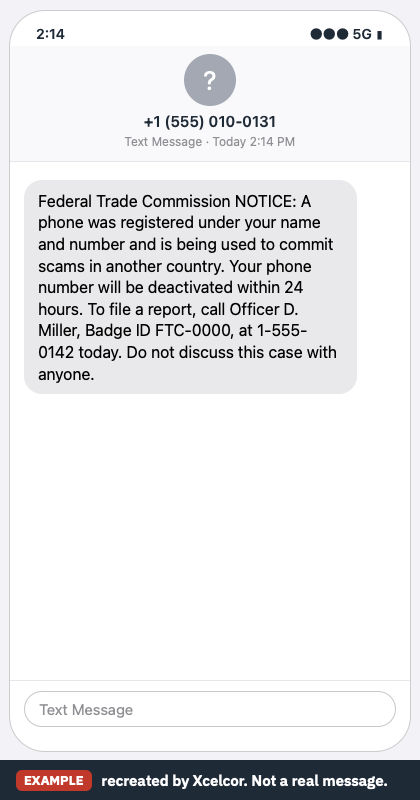
This text arrived on a Tuesday afternoon. Scam or legit?
Show the answer
It’s a scam. It's a scam. The FTC says it will never threaten to disconnect your phone, ask you to send money or tell you to keep a conversation secret, and this text does two of those in a few lines. Don't call the number. Delete the text and report it at ReportFraud.ftc.gov.
Question 2 of 5
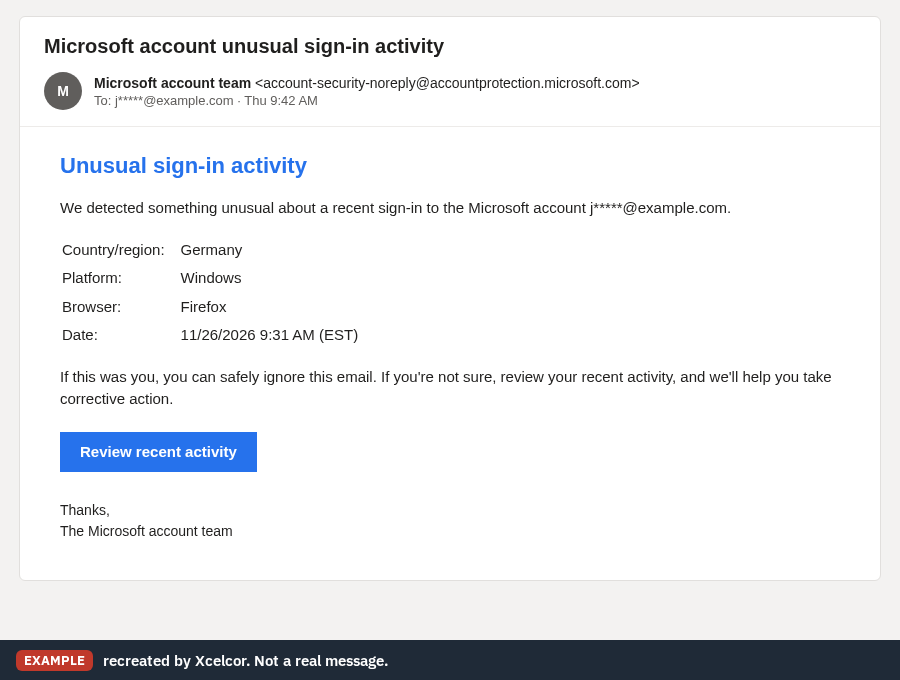
This email landed in an Outlook inbox on Thursday morning. Scam or legit?
Show the answer
It’s real. It's real. Microsoft sends this kind of alert when it sees a sign-in from a new place or device, and its help page says a genuine one comes from account-security-noreply@accountprotection.microsoft.com. Even so, a sender can be faked, so skip the button: type account.microsoft.com into your browser, sign in and check Recent activity yourself.
Question 3 of 5
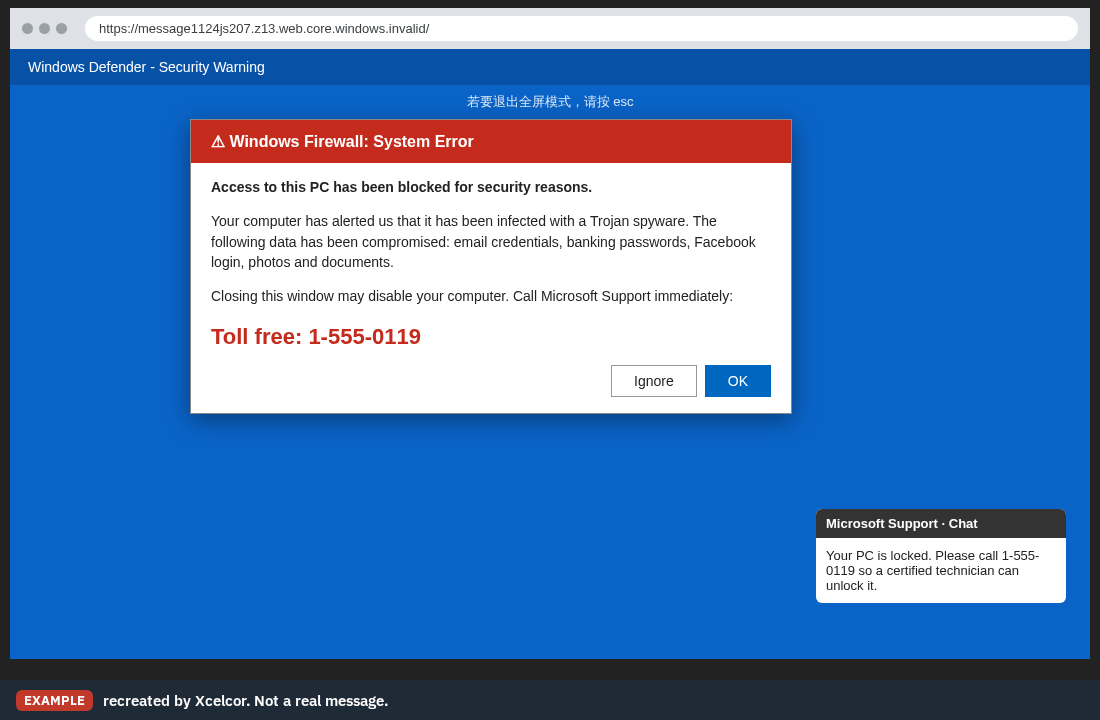
This filled the screen after a click on a news site. Scam or legit?
Show the answer
It’s a scam. It's a scam. Windows never shows security warnings inside a browser tab and Microsoft never puts a phone number in one, whatever the web address looks like. Don't call. Hold the Escape key, close the browser, and don't restore the old tabs when you open it again.
Question 4 of 5
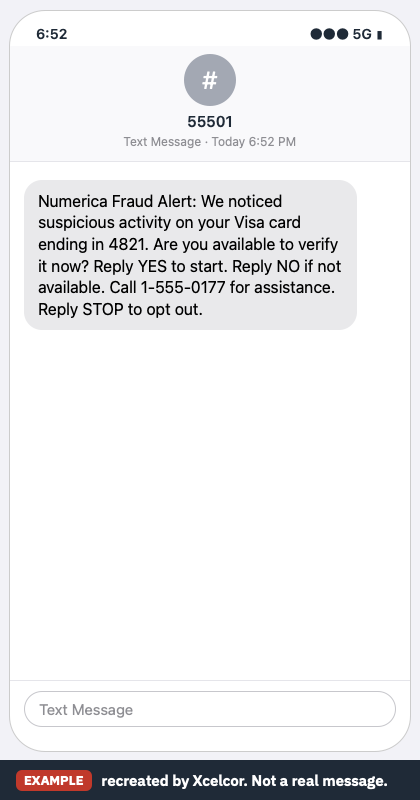
This text arrived on a Wednesday evening. Scam or legit?
Show the answer
It’s real. It's real. It follows the fraud alert Numerica Credit Union describes on its own site: the last four digits of your card, a YES or NO reply, no link and no request for passwords or codes. Fake bank texts copy this style, so if you have any doubt, don't reply: open your banking app or call the number on the back of your card.
Question 5 of 5
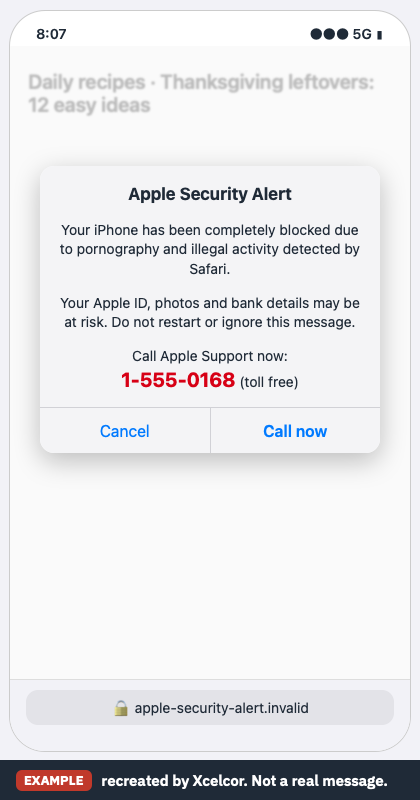
This appeared in Safari while reading a recipe page on an iPhone. Scam or legit?
Show the answer
It’s a scam. It's a scam. It's only a web page, and Apple says to ignore pop-ups that claim your device has a security problem and never to call a number they show. Close the tab, then clear Safari's history and website data in Settings.
Share it with someone who’d get these messages. It might save them.
This week's quiz has five messages: two texts, an email and two pop-ups. Three are scams taken from our recent alerts, and two are real messages, recreated from what the companies themselves say their messages look like. The phone numbers and web links in them are made up.
Look at each one and decide: scam or legit? The answer and the signs to look for come after each question. Plenty of real messages look odd and plenty of fake ones look polished, so don't worry if a few catch you out.
How to check any message in three steps
- Don't use its links or phone numbers. Whoever sent it controls both, and a sender name or caller ID can be faked.
- Open the company's app, or type its web address into your browser yourself. If something really needs your attention, you'll see it there. If you're not sure a web address is genuine, paste it into our website checker.
- If it's about your bank or card, call the number on the back of your card. For anything else, use a number from a bill or from the company's own website.
If one of this week's scams reached you or someone in your family, you can report it to us so we can warn others. This week's examples come from our alerts on calls and texts from fake FTC officials and fake Windows Firewall pop-ups, among others.
Sources
- Microsoft Support: What happens if there's an unusual sign-in to your account
- Numerica Credit Union: Fraud text alerts: What to expect
- FTC: The FTC is not calling to deactivate your phone number (October 22, 2026)
- FTC: How to spot fake FTC websites and FTC impersonators (November 12, 2026)
- PIXM Threat Research: Made in China, Deployed in the US: Fake Microsoft Support Scam (Nov 2, 2026)
- WBAY: Fake Apple security alert scam targets local couple (Oct 21, 2026)
- Apple Support: Recognize and avoid social engineering schemes
Drafted with AI assistance from public sources, then checked and approved by Jake Wilder, Security Awareness & Communications Lead on . See how we work, or tell us about a mistake at support@xcelcor.com.
More on Scams Family and older relatives