"Messages held after the outage" emails are a fake Microsoft 365 notice that steals your email password
Fake "Outage Notification" and "Service Health" emails use the November 12 Microsoft 365 outage to steal work email passwords.
The short version
- Since November 13, 2026, fake emails have claimed four of your messages were held during the Microsoft 365 outage and will be deleted in 24 hours.
- The "RESTORE MESSAGES" button leads to a fake sign-in page that Microsoft believes is meant to collect your email password.
- Microsoft says real service notices never send you to non-Microsoft websites to get held mail back.
- If you typed your password, change it now and sign out of all sessions, or ask whoever runs your email to do it.
- Is it a scam?
- It's a scam. These emails don't come from Microsoft or your IT team, and Microsoft says real service notices never send you to other websites to recover held mail.
- Type
- Email scam
- First reported
- November 13, 2026
- Status
- Still active
- Who it targets
- People with Microsoft 365 work or school email, especially small offices without an IT person
- Tools it uses
- Microsoft 365, Outlook, Exchange Online, SendGrid
Did this reach you too?
Tell us if it did. It helps us see which scams are going around.
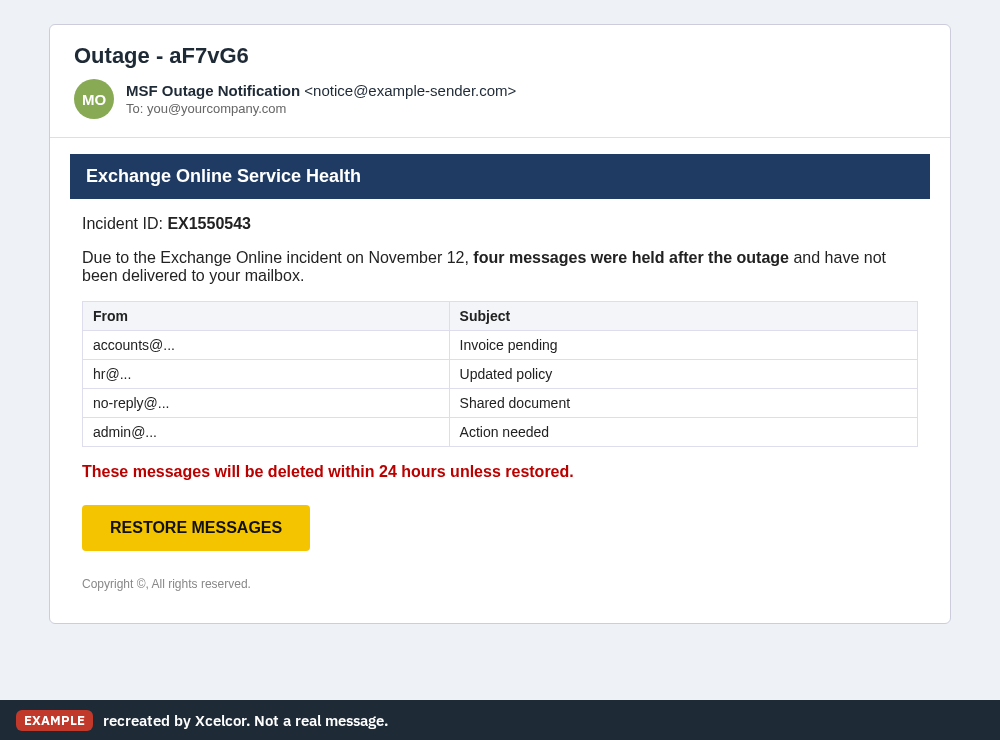
An email saying four of your messages were "held after the outage" and will be deleted in 24 hours is a phishing scam, not a Microsoft notice. Microsoft first saw these emails on November 13, 2026, the day after a real Microsoft 365 email outage. The "RESTORE MESSAGES" button leads to a fake page that Microsoft believes is built to collect your email password.
What does the fake "held messages" email look like?
The emails copy the look of a Microsoft quarantine notice. According to Microsoft's report and security company Mimecast, they usually have:
- A subject starting with "Outage - " and a random code, such as "Outage - aF7vG6". Some start with "Restore" or "Strengthen-Security" instead.
- A sender name made of three letters and "Outage Notification" or "Service Health", such as "MSF Outage Notification" or "AMZ Service Health".
- A line saying four messages were held during the November 12 Exchange Online incident, often quoting the real incident number EX1550543.
- A warning that the messages will be deleted within 24 hours.
- A big "RESTORE MESSAGES" or "TAKE ACTION" button.
Mimecast also saw a second version saying "1 security issue found on your account", with a header that literally reads "DOMAIN Support-Desk" because the scammers forgot to fill in the template.
How does the scam play out?
The outage was real. Microsoft 365 email had problems on November 12, 2026, and Microsoft ruled out a cyberattack as the cause, according to SecurityWeek. The scammers used it because people were already expecting missing mail.
Clicking the button sends you through a tracking link (the emails went out through SendGrid, a bulk email service anyone can sign up for) to another site, such as reallifeaccounting.com, outagefixed.sbs or outagerestored.sbs. Microsoft says the activity "was likely credential phishing", meaning the page asks for your Microsoft 365 email and password. Microsoft says it hasn't confirmed stolen passwords, malware or break-ins from this campaign, and that its Defender for Office protection is blocking the emails.
Security company Field Effect also saw fake Outlook password-reset emails and texts, and fake IT support calls, using the same outage as an excuse. North Carolina Attorney General Jeff Jackson warned on November 23 that scammers may offer to fix accounts or get you refunds after recent outages, according to WRAL.
What should I do if I got this email?
- Don't click the button. In Outlook, use Report, then Report phishing, and delete it.
- If you work somewhere with an IT person or provider, forward it to them so they can block it for everyone.
- If you're the one who runs your office's Microsoft 365, check outages on the Service health page in the Microsoft 365 admin center, which is what Microsoft recommends.
What if I already typed my password?
- Change your Microsoft 365 password now, from a page you open yourself (type office.com into your browser).
- Sign out of all sessions. In your Microsoft account security settings, or in the admin center if you manage it, choose to sign the user out everywhere.
- Turn on two-step sign-in if it isn't already on.
- Check Outlook for new forwarding or inbox rules you didn't make. Scammers add these to read your mail quietly.
- If you used the same password anywhere else, change it there too.
- Warn your contacts if strange emails go out from your account, and report it at ReportFraud.ftc.gov.
How do I spot the next one?
- Real Microsoft quarantine notices come from quarantine@messaging.microsoft.com, according to Field Effect. Check the sender's actual address, not just the name.
- A countdown ("deleted within 24 hours") is a pressure trick. Real mail systems don't delete your mail because you didn't click a button.
- Hover over (or long-press) a button before you tap it. If the address isn't a Microsoft one, don't sign in.
- After any big outage, expect fake "restore", "refund" and "reset" messages for a few weeks.
Our guide to email security has more on spotting fake sender addresses, and small offices can check their own domain with the free email security checker.
What we found
We looked up every web address Microsoft named on November 26, 2026, using public records (domain registrations, DNS and hosting records). These are facts about the addresses, not proof of who runs them.
| Address | Registered | Still answers? | Notes |
|---|---|---|---|
| outagerestored.sbs | November 13, 2026 | No | Registered the same day Microsoft first saw the emails. The registry has put it on hold. |
| outagefixed.sbs | November 13, 2026 | Yes | Registered the same day as the one above, with the same registrar (Dynadot). Sits behind Cloudflare. |
| reallifeaccounting.com | 1999 | Yes | An old name, now behind Cloudflare. Records were updated on November 10, 2026. |
| moments-notice.com | 1996 | No | Put on hold at its registrar. Its records last changed on November 14, 2026. |
| planetmaison.com | 2015 | Yes | Now points at a domain parking service in Australia. |
| newbooker.com | 2015 | Yes | Hosted in Sweden. Its registration runs out on December 2, 2026. |
The two .sbs sites were brand new, set up the day after the outage. The older names were registered years ago. Scammers sometimes buy lapsed domains or take over real sites so their email looks less suspicious, but public records can't tell us which happened here. None of these addresses sits on a free platform anyone can use.
Phone numbers, messages and files linked to this scam
Web addresses are written with [.] so they can’t be clicked by mistake. If something you received matches, it’s this scam.
Email subjects
Outage -
Followed by a random code, for example "Outage - aF7vG6". Some subjects start with "Restore" or "Strengthen-Security" instead.
What the message or pop-up says
four messages were held after the outage
Microsoft's description of the email body
Action required: (4) messages held after the outage
Reported by Mimecast
RESTORE MESSAGES
The button in the email
TAKE ACTION
Button in some versions
1 security issue found on your account
A second version reported by Mimecast
Websites
moments-notice[.]comSending domain named by Microsoftplanetmaison[.]comSending domain named by Microsoftnewbooker[.]comSending domain named by Microsoft. Links went through url7489.newbooker.com.reallifeaccounting[.]comWhere the button led, often to a page ending /themelist0.htmloutagefixed[.]sbsSite the links led to, named by Microsoftoutagerestored[.]sbsSite the links led to, named by Microsoft (a page ending /themelist0.html)
Other signs
MSF Outage NotificationSender name. The three letters at the start change, followed by "Outage Notification" or "Service Health".AMZ Service HealthSender nameMail-Restore-AuthSender name reported by MimecastEX1550543The real Microsoft incident number for the November 12 outage, quoted in the fake emails
Questions people ask
Were my emails really held during the Microsoft outage?
Microsoft 365 email had a real outage on November 12, 2026 (incident EX1550543), but you don't need to click anything to get mail back. If you run your own Microsoft 365, check the Service health page in the Microsoft 365 admin center.
What does a real Microsoft quarantine email look like?
Real quarantine notices come from quarantine@messaging.microsoft.com with the subject "Microsoft 365 security: You have messages in quarantine", according to Field Effect. They don't threaten to delete mail in 24 hours.
I clicked the button but didn't type anything. Am I OK?
Microsoft hasn't seen these pages install anything, so the risk is low. Close the page, delete the email and report it as phishing in Outlook.
I typed my password. What now?
Change your Microsoft 365 password from a page you open yourself, sign out of all sessions and turn on two-step sign-in. Tell whoever looks after your email so they can check for new forwarding rules.
Sources
- Microsoft Security Blog: High volume phishing campaign uses Microsoft 365 outage lures to target multiple industry sectors (November 16, 2026)
- FTC: How to recognize and avoid phishing scams
- Mimecast: Attackers exploit the Microsoft 365 outage with fake "held messages" lures
- Field Effect: Microsoft 365 outage theme drives credential phishing and support scams
- PCWorld: Microsoft's Outlook outage is over. The scams aren't.
- WRAL: North Carolina AG Jackson is warning of scams amid nationwide outages
Drafted with AI assistance from public sources, then checked and approved by Jake Wilder, Security Awareness & Communications Lead on . See how we work, or tell us about a mistake at support@xcelcor.com.
More on Scams Email security Small business