Is AnyDesk safe? Yes, when you start the call. Here's when it isn't
AnyDesk is a real, legitimate tool. What makes it safe or dangerous is who is on the other end, and who asked for the connection.
AnyDesk itself is safe. It's a legitimate remote desktop app used by IT teams and help desks, and installing it from the real site won't harm your PC. The risk is the person you let connect: once someone is in, they can see and control your computer, which is exactly why scammers ask for it.
So the useful question isn't "is the app safe?" It's "is this session safe?" That depends on one thing more than any other: who asked for the connection.
Is it safe to install AnyDesk?
Installing AnyDesk on its own doesn't open your computer to anyone. In the normal setup, a person who wants to connect needs your AnyDesk number, and a request appears on your screen that you have to accept. Nobody gets in just because the app is there.
What changes that is something you give away: your AnyDesk number plus a click on Accept, or an "unattended access" password that lets someone connect later without asking. Scammers ask for both. A caller who wants you to set a password "so I can finish the work tonight" is asking for a key to your house.
If you installed AnyDesk because a stranger told you to, and you don't use it for anything else, you can remove it. On Windows 11, open Settings, then Apps, then Installed apps, find AnyDesk, and choose Uninstall. On Windows 10 it's under Apps & features.
Is AnyDesk legit, or is it malware?
AnyDesk is a real company and a real product. CISA, the US government's cybersecurity agency, calls it legitimate remote monitoring and management software, and it's used for real support work every day.
The same CISA advisory explains why that matters for scams. Criminals sent phishing emails that led people to download legitimate tools, ScreenConnect and AnyDesk, and then used them to take over the victim's computer. Because the software is genuine, it doesn't look like malware. Nothing in the app is "bad"; the person using it is.
If you do need AnyDesk, type the address into your browser yourself rather than following a link someone sent you.
When is AnyDesk not safe?
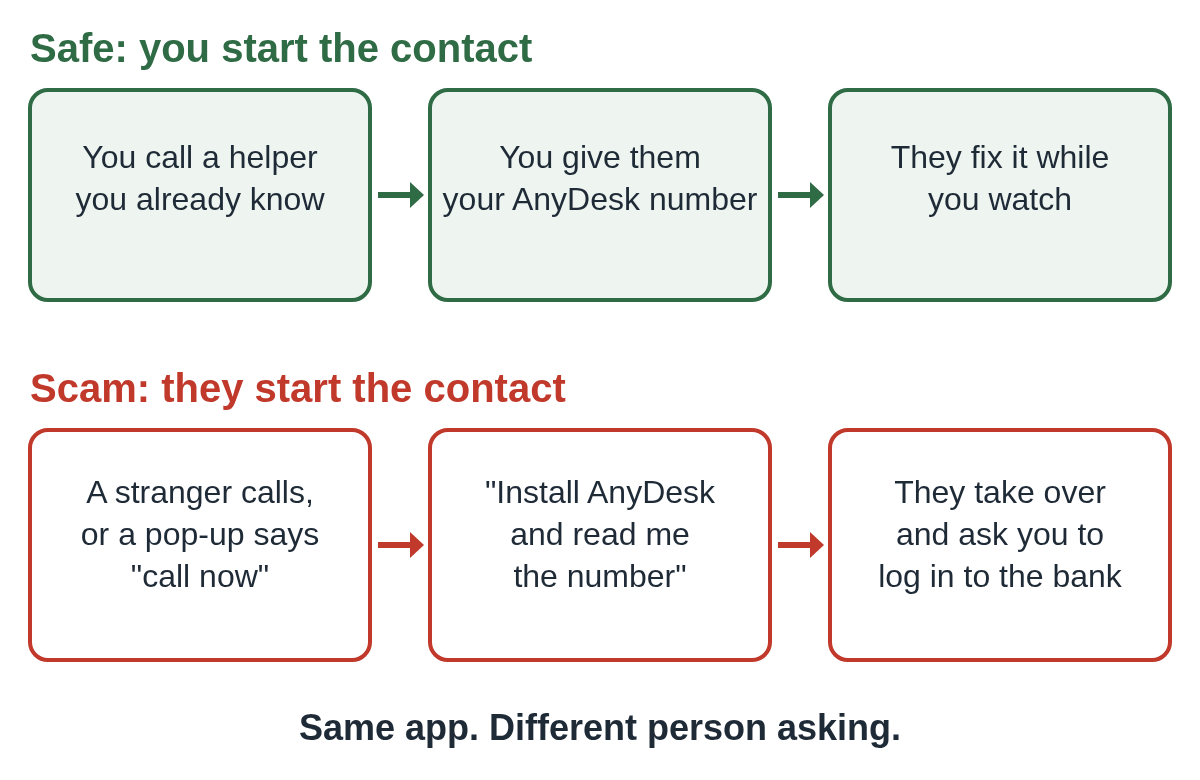
The pattern is the same in nearly every case. Someone you didn't call contacts you, or a pop-up tells you to call them, and the conversation ends with "please download AnyDesk."
The FTC says scammers on the phone "ask for remote access to your computer and pretend to scan it for viruses." It also says real tech companies won't contact you by phone, email, or text about a problem with your computer. AnyDesk says the same about itself: it only answers support tickets you start, and it warns that scammers pose as AnyDesk support.
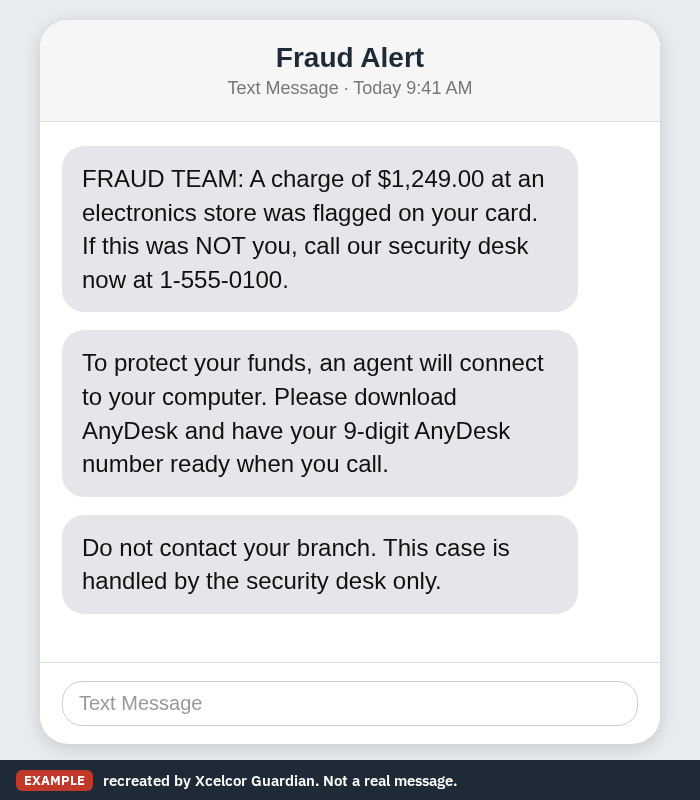
Sometimes the first contact is a text or an email made to look like your bank's fraud team. It might read something like this.
Here are the signs that a session isn't safe, whatever the caller says:
- You didn't start the contact. They called, texted, emailed, or a pop-up told you to call.
- They say they're from your bank, Microsoft, Amazon, your internet provider, or AnyDesk itself.
- They ask you to read out your AnyDesk number, or to set an unattended access password.
- Once connected, they ask you to log in to your bank "so we can check" or "so we can send your refund."
- They tell you not to hang up, not to tell family, or not to talk to your bank.
Why scammers like remote access tools
A remote session lets the scammer run the whole show from their side. They can open programs, show you things that look like proof, and wait while you log in to your accounts.
CISA describes one version step by step. After getting remote access, the criminals changed what the victim's bank page showed so it looked like a refund had been overpaid. Then they told the victim to "send back" the extra money. The bank balance was never really changed; the screen was.
This is why "the screen showed it" isn't proof of anything during a remote session. If you ever see an unexpected refund, an overpayment, or an alarming balance while someone is connected, hang up and check your account from another device, or call the number on the back of your card.
Is AnyDesk safe after the 2024 hack?
In February 2024, AnyDesk said attackers had broken into its production systems. The company revoked its security certificates, reset passwords for its customer web portal, and released new versions of the app signed with a new certificate. It said it had found no evidence that end-user systems were affected.
If you use AnyDesk, keep it updated, and don't reuse your AnyDesk account password anywhere else. That incident isn't how most people get hurt, though. Most harm comes from someone being invited in by phone.
What to do if a stranger connected through AnyDesk
If someone you don't know is connected right now, end it quickly. Disconnect the PC from the internet (unplug the cable or turn off Wi-Fi), then hang up.
After that, call your bank using the number on the back of your card, from another phone, and change your email password from a different device. Follow our two-minute checklist for the rest, and see what to do after a remote access scam for the days after.
You can report it to the FTC at ReportFraud.ftc.gov and to the FBI at ic3.gov. If the caller said they were from your bank, read why a bank will never ask you to install AnyDesk, and look at the fake bank support chat that downloads AnyDesk.
How to keep using AnyDesk safely
AnyDesk is a fine tool for helping family or getting support you asked for. A few habits keep it that way:
- Only connect with someone you contacted first, using a number or address you found yourself.
- Never read out your AnyDesk number to someone who called you.
- Don't set up unattended access unless you know exactly who will use it.
- Never log in to your bank or email while someone else is connected.
- If you don't use it, uninstall it. You can also block AnyDesk and TeamViewer requests on a home PC.
For a wider look at how these tricks play out, see AnyDesk scams, or browse more posts on remote access.
If you'd like a second line of defense, Xcelcor Guardian holds every new remote connection on a Windows PC, including AnyDesk, until the account holder approves it by email or on our website. It lowers the risk of a caller getting in, but it isn't antivirus and it doesn't catch every scam.
Questions people ask
Can someone use AnyDesk without me knowing?
Not in the normal setup. A connection request appears on your screen and you have to accept it. If someone set up unattended access with a password, they can connect without asking, so remove AnyDesk or change that setting if a stranger had access.
Does AnyDesk ever call you?
No. AnyDesk says it only answers support tickets that you start, and it warns that scammers pose as AnyDesk support.
Should I uninstall AnyDesk?
If a stranger asked you to install it and you don't use it for anything else, yes. On Windows 11, go to Settings, then Apps, then Installed apps, and uninstall it.
I let a stranger connect. What now?
Disconnect from the internet, hang up, and call your bank from another phone. Then follow our two-minute checklist.
Sources
- CISA: Protecting Against Malicious Use of Remote Monitoring and Management Software (AA23-025A)
- FTC: How To Spot, Avoid, and Report Tech Support Scams
- AnyDesk: Abuse management
- AnyDesk: How to Avoid Remote Access Scams
- TechCrunch: Remote access giant AnyDesk resets passwords and revokes certificates after hack (February 5, 2024)
Reviewed by Thomas Whitmore, Research & Strategy, on .
Last updated