Is UltraViewer safe? Yes, when you choose who connects. Here's when it isn't
UltraViewer is a real remote desktop app. Whether it's safe depends on who has your ID and password, and who asked for them.
UltraViewer itself is safe. It's a real, free remote desktop program that people use to help each other with computer problems, and it isn't a virus. The risk is who you give your UltraViewer ID and password to: anyone who has both can see your screen and control your computer.
So the better question is "is this session safe?" The answer almost always comes down to who asked for the connection. If you called someone you know, it's usually fine. If a pop-up or a stranger told you to install UltraViewer, it's a scam.
Is UltraViewer a virus or a scam?
No. UltraViewer is a legitimate remote control tool, in the same family as TeamViewer and AnyDesk. Bitdefender lists it alongside those two as a genuine remote desktop tool that scammers ask people to install.
That's the catch. Because the program is real, installing it won't set off alarms, and the scammer doesn't need to sneak anything onto your PC. UltraViewer's own website says it plainly: "Some people misuse UltraViewer to scam others." The software isn't the problem. The person on the other end is.
How does UltraViewer let someone in?
When you open UltraViewer, it shows an ID and a password for your computer. UltraViewer's help pages say both are made up at random each time you open the program, and that other people can only control your computer if you share that ID and password with them.
Think of the pair as a house key. Reading them out to someone is the same as handing that key over. Once they connect, they can move your mouse, type, open programs and see whatever is on your screen, including your bank if you log in.
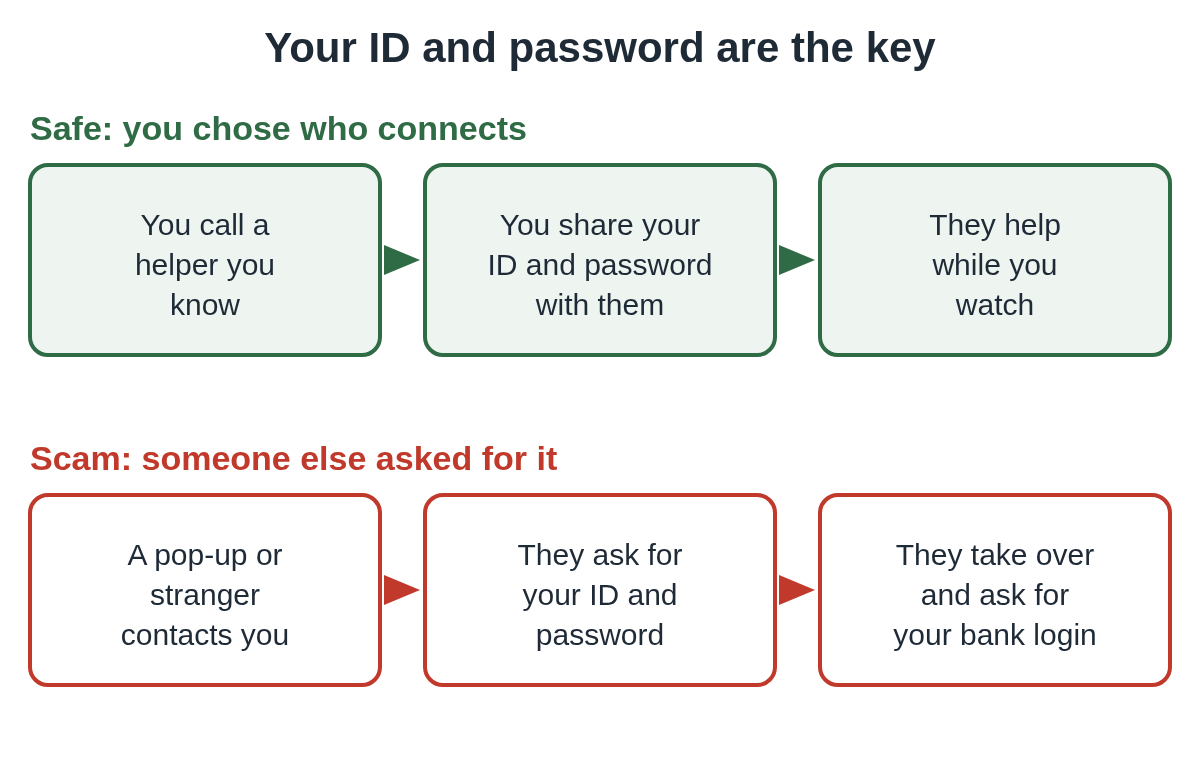
UltraViewer's help pages also say you can take the mouse back whenever you want, and suggest keeping an eye on what the other person does. That works with a helper you trust. With a scammer it's much harder, because they'll keep you talking while they work.
When is UltraViewer not safe?
The pattern is nearly always the same. Something alarming happens, a number appears, and the person who answers asks you to download UltraViewer.
In October 2026, researchers at the security company Infoblox called a number shown on a fake "Microsoft has disabled your computer" screen. The man who answered said he was Microsoft support, cleared the fake lock, and then told them to go to ultraviewer.net and download UltraViewer. When they asked why, the call ended. We wrote that campaign up in our alert on the fake Microsoft screen that leads to UltraViewer.
Microsoft says error and warning messages from Microsoft never include a phone number, and that it won't call you to offer support unless you asked. The FTC gives the same warning about tech companies in general: they don't contact you out of the blue about a problem with your computer.
The same steps can come through a chat window on a scam page instead of a phone call. This recreation shows the order they usually come in.
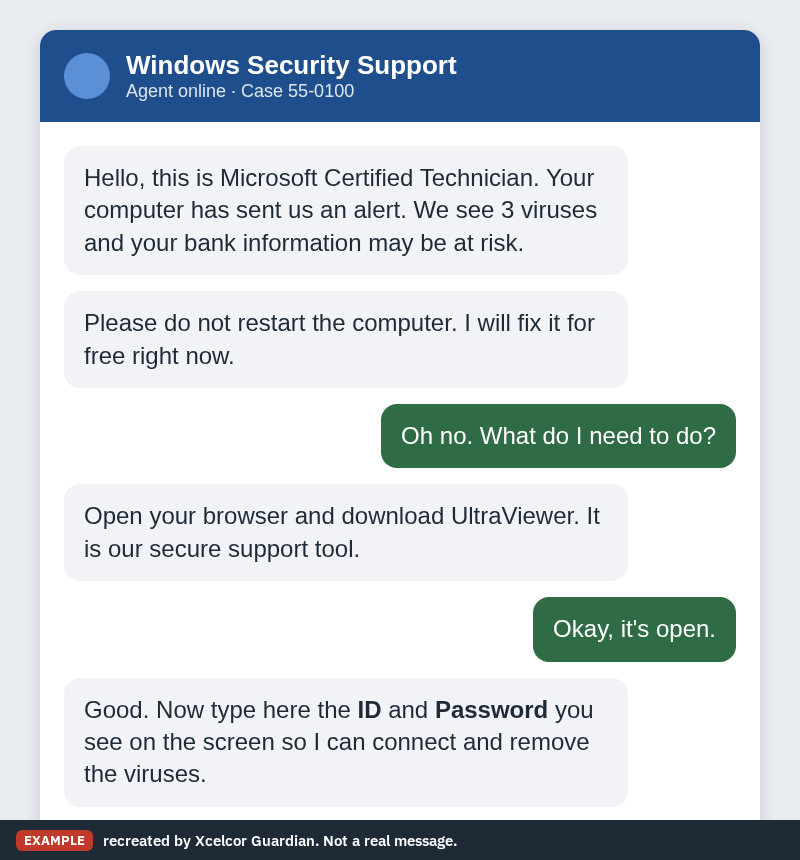
Here are the signs that an UltraViewer session isn't safe:
- You didn't start the contact. A pop-up, a call, a text or an email came to you first.
- The person says they're Microsoft, your bank, your antivirus company, Amazon or your internet provider.
- They ask you to read out your UltraViewer ID and password.
- Once connected, they ask you to log in to your bank or email "to check" something.
- They tell you not to hang up, not to restart, or not to tell anyone.
Is it safe to download UltraViewer?
Downloading and installing it doesn't open your computer to anyone on its own. Nobody can connect until they have your current ID and password.
If you need it to get help from someone you trust, type ultraviewer.net into your browser yourself rather than following a link from a caller. If you only installed it because a stranger told you to, and you don't use it for anything else, uninstall it. On Windows 11, open Settings, then Apps, then Installed apps, find UltraViewer and choose Uninstall. On Windows 10 it's under Apps & features.
Can someone use UltraViewer without me knowing?
Not in the normal setup. Someone needs the ID and password shown on your screen, and the password changes each time you open the program.
But if a stranger has already been connected, don't assume closing UltraViewer ends it. While they were in, they could have changed settings or installed a second remote tool so they can come back. That's why the steps below include removing the software and checking with your bank.
What to do if a stranger connected through UltraViewer
If someone you don't know is connected right now, disconnect the PC from the internet (unplug the cable or turn off Wi-Fi), then hang up.
After that:
- Call your bank from another phone, using the number on the back of your card.
- Change your email password from a different device.
- Uninstall UltraViewer and anything else the caller told you to install.
Follow our two-minute checklist for the rest, and see what to do after someone remotely accessed your computer for the days after.
You can report it to the FTC at ReportFraud.ftc.gov, to the FBI at ic3.gov, and to Microsoft at microsoft.com/reportascam if the caller said they were Microsoft. UltraViewer also has a scam report form on its website. Its instructions say you can find the other person's ID in UltraViewer under File, then View logs.
How to use UltraViewer safely
UltraViewer is a fine way to get help from a relative or a technician you chose. A few habits keep it that way:
- Only share your ID and password with someone you contacted first, using a number you found yourself.
- Never read them out to someone who called you, or whose number came from a pop-up.
- Close UltraViewer when the session is over, so the password changes next time.
- Don't log in to your bank or email while someone else is connected.
- If you don't use it, uninstall it.
If you'd rather nobody could connect at all, see how to block remote access on Windows 11. For a closer look at the pop-ups that start most of these calls, read about fake Microsoft pop-ups that say call this number. The same thinking applies to other tools, as in our post Is AnyDesk safe?, and you can browse more posts on remote access.
If you look after someone who might get one of these calls, Xcelcor Guardian lowers the risk on a Windows 11 PC. It holds new remote connections from tools it recognizes, such as AnyDesk, TeamViewer and Quick Assist, until the account holder approves them by email or on our website. It isn't antivirus, and it won't catch every scam.
Questions people ask
Is UltraViewer a virus?
No. It's a real remote desktop program. It becomes dangerous only when a stranger gets your UltraViewer ID and password.
Does Microsoft use UltraViewer for support?
A Microsoft agent will never call you out of the blue or show a phone number on a warning. Anyone who reached you that way and asks you to install UltraViewer is a scammer.
Should I uninstall UltraViewer?
If a stranger asked you to install it and you don't use it otherwise, yes. On Windows 11, go to Settings, then Apps, then Installed apps.
I gave a stranger my UltraViewer ID and password. What now?
Disconnect from the internet, hang up, and call your bank from another phone. Then follow our two-minute checklist.
Sources
- UltraViewer: FAQ, security
- UltraViewer: Report scam
- Microsoft Support: Protect yourself from tech support scams
- FTC: How To Spot, Avoid, and Report Tech Support Scams
- Infoblox Threat Intel: Inside Help TDS: Hotejka, Cloudflare Pages, and Predictive Detection (Oct 15, 2026)
- Bitdefender: What are Remote Access Scams?
Reviewed by Bob Carter, CEO, on .
Last updated