Amazon scam calls: how the fake Amazon call works, and the moment to hang up
The fake Amazon call follows the same steps every time: a scare, a refund, a download, and a request to send money back.
If someone calls saying they're from Amazon about a purchase you didn't make, a problem with your account, or a package that can't be delivered, hang up. It's very likely a scam. Amazon says it won't ask you to install software, give remote access to your device, or pay for customer service, so a caller who asks for any of those isn't Amazon.
To check your account, open the Amazon app or type amazon.com yourself and look at Your Orders. If there's no strange order there, there's no problem to fix.
What does an Amazon scam call sound like?
The FTC describes the most common opening as a recorded message. It says something is wrong with your Amazon account: a suspicious purchase, a lost package, or an order Amazon can't fill. Then it tells you to press 1 to speak to someone, or gives you a number to call.
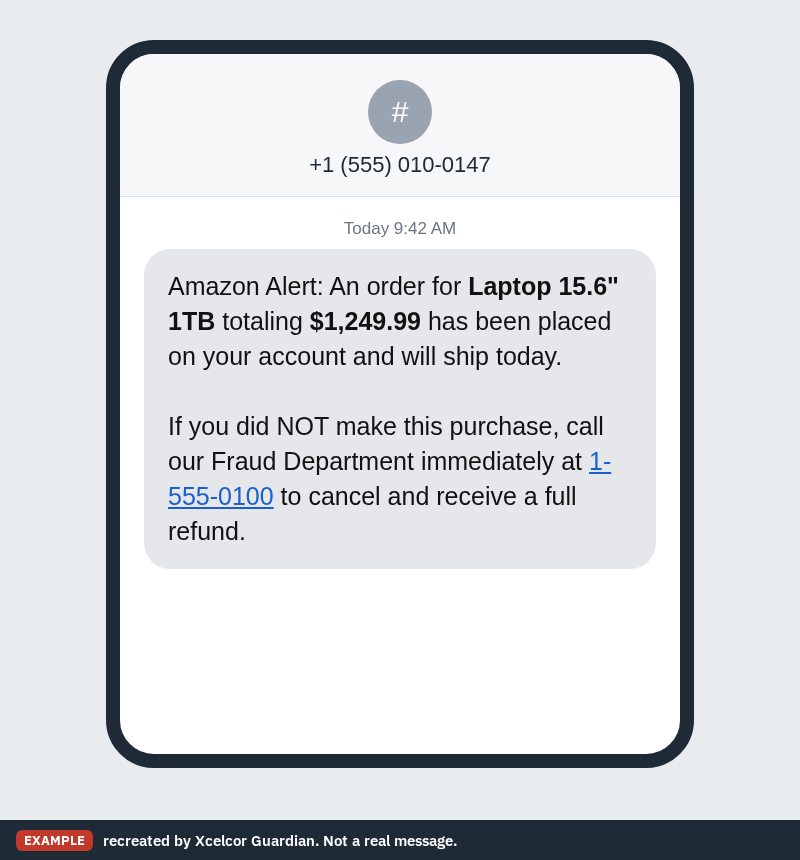
Some people never get a call at all. They search online for Amazon's support number and land on a fake one, and the FTC has heard from people who reached scammers that way. Others get a text or email with a number in it, like the example below. Amazon says not to call numbers sent in texts or emails, or numbers you find in search results.
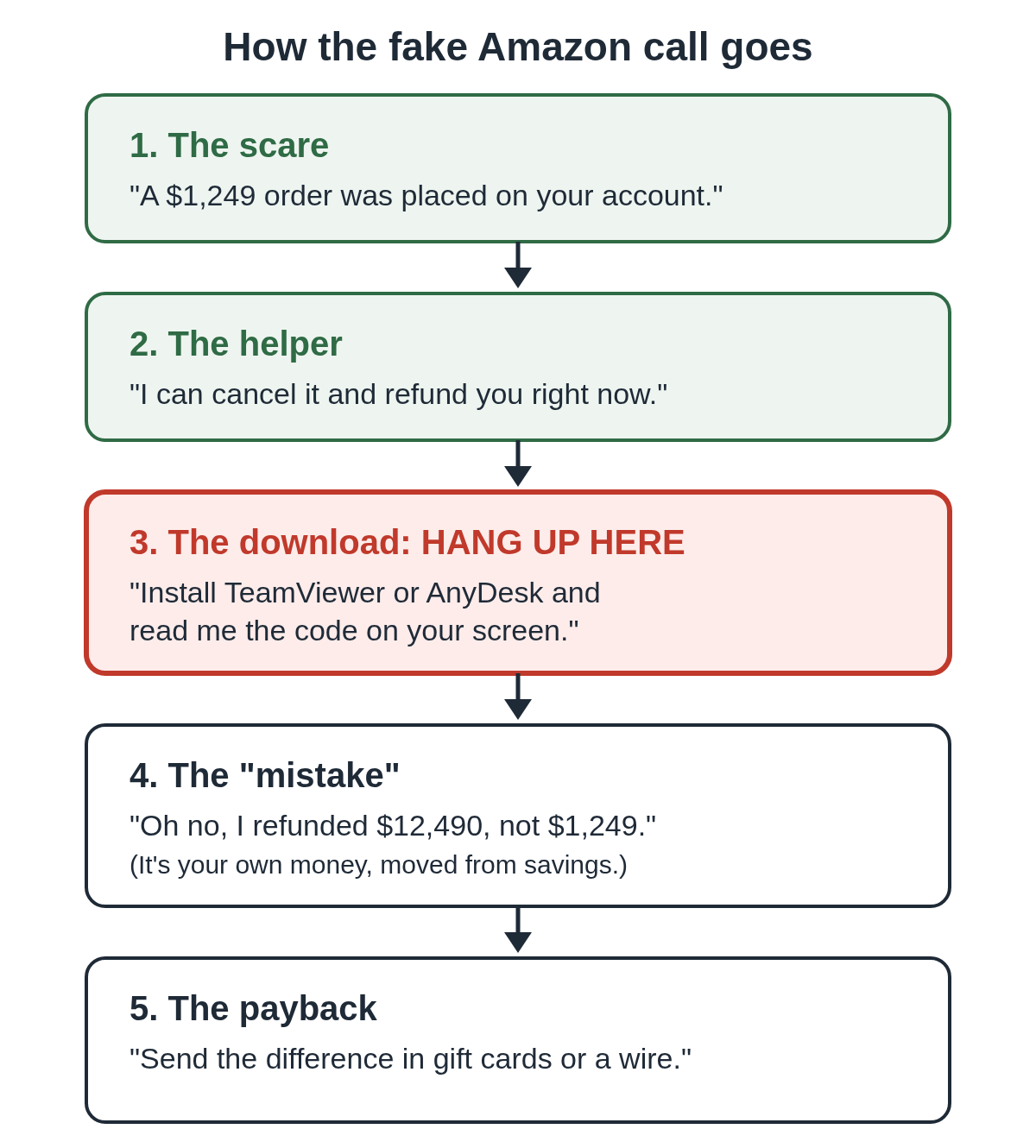
How the fake Amazon call plays out
The details change, but the reports the FTC collected show the same steps again and again.
- The scare. You hear about an expensive order you didn't place, or that your account was hacked.
- The helper. A friendly "Amazon representative" offers to cancel the order and refund you.
- The download. To do the refund, they ask you to install a program such as TeamViewer or AnyDesk and read them a code. That gives them control of your computer.
- The "mistake." They show you a refund that's far too big, because extra zeros were typed in. What really happened is they moved your own money, often from savings into checking, so it looks like a deposit.
- The payback. They ask you to return the difference by gift card, wire or cash. The FTC says some callers claimed they'd be fired if the money didn't come back.
There is no refund. Every dollar you "send back" is your own. Our guide to the refund scam where the caller says they refunded you too much walks through that last step in detail.
Why do Amazon scammers ask for remote access?
Remote access is what turns a phone call into stolen money. Once a stranger controls your screen, they can open your bank's website, change what you see, and make a fake refund look real.
TeamViewer and AnyDesk are honest programs that IT staff use every day. The problem is the stranger on the other end. You can see how callers use them in our guides to TeamViewer scams and AnyDesk scams.
The FTC's advice is simple. Never give anyone remote access unless you contacted the company first, using its real number. If someone tells you to give remote access to get a refund, it's a scam.
The gift card version
Another script skips the computer. The caller says hackers got into your account and the only way to protect it is to buy gift cards and read out the numbers on the back. They may call them "blocking codes" or "security codes." The FTC says some people then got texts about account credits matching each card, which made it look like it was working.
Amazon says it will never ask you to buy a gift card, and that no real sale or transaction needs to be paid with one.
Why do so many people get Amazon scam calls?
Amazon is the business scammers pretend to be most often. In FTC reports from July 2020 to June 2021, about one in three people who reported a business impersonator said the scammer claimed to be Amazon. About 70% of those reports named a phone call as the way the scammer made contact. People 60 and older were more than four times as likely as younger people to report losing money, and the median reported loss was $1,000.
It hasn't stopped. Amazon says that in 2025 it started takedowns of more than 70,000 phishing websites and 14,000 phone numbers used to impersonate it. Nearly everyone has an Amazon account, so a call about an order sounds believable to almost anyone. Getting one doesn't mean you did something wrong.
What Amazon won't do
Amazon says it won't:
- ask you to download or install software to reach customer service
- ask for remote access to your computer or phone
- ask you to pay for customer service
- ask you to buy gift cards
- call and ask you to make a payment or bank transfer on another website
If a caller asks for any of these, hang up. You don't owe them a goodbye.
I already let them on my computer. What now?
Don't wait for them to call back. Do these now:
- Unplug the internet cable or turn off Wi-Fi on the computer.
- From a different phone, call your bank using the number on the back of your card and tell them a scammer had access.
- From another device, change your email password, then your Amazon and bank passwords.
- Remove the remote access program the caller had you install.
Follow our two-minute checklist for each step, and read what to do after a remote access scam for the days after.
How to report an Amazon scam call
Report it to the FTC at ReportFraud.ftc.gov. Amazon customers can use Amazon's scam reporting page, and anyone can email reportascam@amazon.com. If you lost money, you can also file a report with the FBI at ic3.gov.
Lowering the risk next time
The step that does the damage is the remote connection. Xcelcor Guardian is a Windows 11 app that holds every new remote connection, from TeamViewer, AnyDesk, Quick Assist and others, until the account holder approves it by email or on xcelcor.com. The computer itself only shows a Refuse button, so a caller can't talk anyone into clicking "allow" on the spot. That account holder can be a grown child or another relative, not the person on the phone. It lowers the risk. It doesn't replace hanging up.
You'll find more on how these tricks work in our scams section.
Questions people ask
Is a call about an Amazon order I didn't make real?
Treat it as a scam and hang up. Then open the Amazon app, or type amazon.com yourself, and look at Your Orders. If the order isn't there, there's nothing to cancel.
Will Amazon ask me to install TeamViewer or AnyDesk?
No. Amazon says it won't ask you to download or install software to reach customer service, and it won't ask for remote access to your device.
I pressed 1 but hung up. Am I OK?
Pressing 1 just connects you to the scammer. If you didn't share details, install anything or pay, you can ignore any calls that follow. If you did any of those, follow our two-minute checklist.
Sources
- FTC Consumer Alert: Fake calls from Apple and Amazon support: What you need to know (December 3, 2020)
- FTC Consumer Alert: Amazon impersonators: what you need to know (October 20, 2021)
- FTC Data Spotlight: Amazon tops list of impersonated businesses (October 20, 2021)
- Amazon: 6 tips to help you spot and avoid scams impersonating Amazon
Reviewed by Dana Cross, Trust & Distribution, on .
Last updated