Help desk social engineering: how attackers talk their way into a password reset, and the checks that stop it
Attackers call your help desk as an employee and ask for a password or MFA reset. Here's how the call goes and how to verify callers properly.
Help desk social engineering is when an attacker calls or messages your IT help desk pretending to be an employee and asks for a password reset or a new MFA device. If the agent agrees, the attacker logs in as that person, often without tripping a single alert. The fix is a verification process that doesn't trust anything the caller can already know: call back the number on file, get a manager to confirm, and treat MFA changes as the most sensitive request your desk handles.
This post covers how these calls go, according to CISA, Microsoft, the UK's NCSC and the US health department, and the checks that stop them. There's a printable verification script near the end.
How does help desk social engineering work?
The attacker does the homework first. CISA's advisory on the group known as Scattered Spider says it posed as employees to get IT and help desk staff to share information, reset the employee's password and move their MFA to a device the attacker controls. The same group also works the other way round, posing as IT to get one-time codes from employees.
Microsoft's write-up on the same group (it calls it Octo Tempest) says the callers research the company, copy the way staff talk on the phone and use personal details to sound real. Microsoft says they have also posed as newly hired employees.
The details matter because most help desk checks ask for exactly what an attacker can find: a name, a manager, an employee ID, a date of birth.
What does the call sound like?
In April 2024 the US Department of Health and Human Services (HC3) warned health organizations about a pattern its alert described in detail, as reported by Security Affairs:
- The call came from a local area code, from someone claiming to work in finance.
- The caller gave the last four digits of the employee's Social Security number, their corporate ID and other personal details.
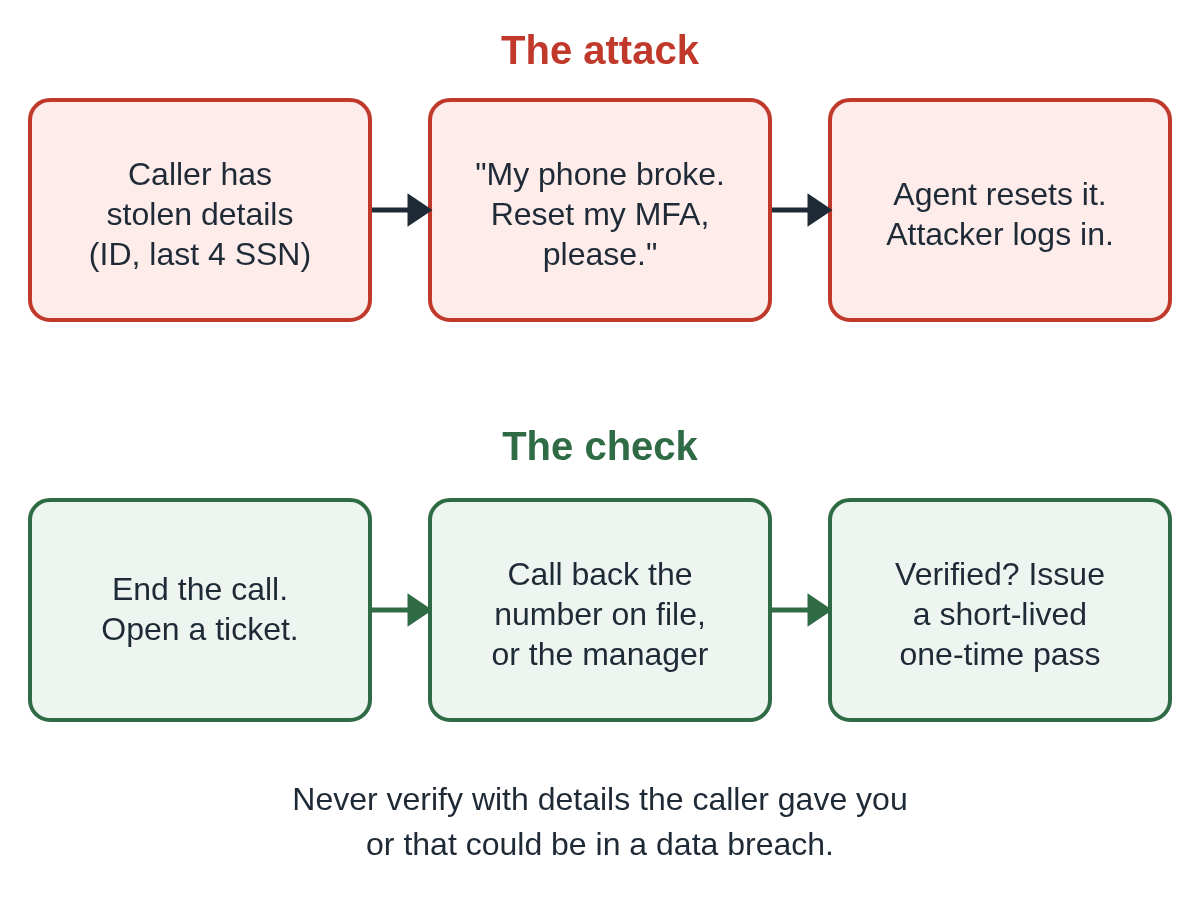
- They said their phone was broken, so they couldn't receive MFA codes, and asked the desk to enroll a new device.
- Once in, they went after payment systems and email, and sent instructions to divert real payments to accounts they controlled.
- In some cases, the alert said, they tried AI voice impersonation.
None of that requires hacking. It requires a believable story, a few leaked details and an agent who wants to help.
Why do MFA resets matter more than password resets?
A reset password still sits behind MFA. A reset MFA device removes the second lock entirely. CISA lists "transfer MFA tokens" right next to password resets as the goal of these calls, and the HHS alert shows the broken phone story is built to get exactly that.
Treat these as the most sensitive tickets your desk handles:
- Enrolling a new MFA device or phone number.
- Removing all MFA methods so the user can "set it up again".
- Resetting a password on an account with admin roles.
- Changing the phone number or email used for account recovery.
Which checks actually stop it?
The rule is simple: never verify a caller with information they gave you, or information that could be in a breach. Verify through a channel the attacker doesn't control.
Call back the number on file
The HHS alert's first recommendation is to require callbacks to the phone number on record before resetting a password or enrolling a new device. End the call, look the person up in your HR or directory system, and call that number. If the caller says the phone on file is the one that's broken, that's your cue to use the next check, not to skip it.
Get the manager to confirm
HHS also recommends policies that require the employee's supervisor to be contacted to verify these requests. Reach the manager through your own directory, not a number or name the caller gives. For finance roles and admins, make this the rule every time.
See the person, when you can
For a lost phone with no working callback, verify on a video call against the person's ID photo, or in person at the office. It's slower. That's the point: the attacker is counting on speed.
Issue a short-lived pass, not a permanent change
Once the person is verified, give them a way to set up their own new method instead of the agent doing it for them. In Microsoft Entra ID, a Temporary Access Pass is a time-limited passcode that can be set for one use. The user signs in with it and registers their new MFA method themselves.
Limit what the help desk can reset
Microsoft's guidance for this group is to scope help desk admin roles so they can't act on Global Administrators, and to make privileged roles eligible rather than permanent with Privileged Identity Management. The NCSC's advice after the 2025 UK retail attacks says the same in plainer words: review how the help desk authenticates staff before resetting passwords, "especially those with escalated privileges".
Watch what happens after a reset
Log every password and MFA reset with the ticket number, and have security review them. The NCSC recommends watching for risky logins and logins from unusual sources, such as VPN services in residential ranges. A reset followed within minutes by a sign-in from a new country or a new device is worth a phone call.
What do attackers do after they get in?
Often, they install remote access software that looks like normal IT. CISA's advisory lists the tools the group used, including ScreenConnect, AnyDesk, TeamViewer, Splashtop and Tactical RMM. That's why the advisory's first actions include phishing-resistant MFA and application controls that decide which software can run.
If you haven't locked down remote tools yet, see how to block unauthorized RMM tools and how to find unauthorized ScreenConnect instances.
The same trick, pointed at your staff
Attackers also run this in reverse: they pose as the help desk and contact employees. We cover that version in Microsoft Teams IT help desk scams, and the current campaign in our alert on fake IT Support messages in Teams. Tell staff the help desk will never ask them for a code, and give them one number to call if they're unsure.
What to do if a reset was already granted to an attacker
- Disable the account, revoke its sessions and remove any MFA methods added since the reset.
- Check the sign-in logs for the account from the time of the call.
- Look for new remote access software, mail forwarding rules and payment or bank detail changes.
- Contact the real employee through a known number and reset their access in person or on video.
- Report it to the FBI at ic3.gov.
If the attacker reached an employee's home PC rather than your network, our two-minute checklist covers the first steps.
A printable verification script
We made a one-page script your agents can keep by the phone. It lists the requests that need verification, the checks to use and what to say when a caller pushes back.
Help desk verification script (PDF)
Where Guardian fits
Verification at the help desk protects the account. It doesn't cover the next step, when an attacker who got in tries to open a remote session to a staff PC. Xcelcor Guardian for Business holds every new AnyDesk, TeamViewer, Quick Assist, ScreenConnect or RDP connection on a Windows 11 PC until the account holder approves it, and the approval shows which tool is asking and from where. It lowers the risk of a stranger getting onto a staff PC. It isn't antivirus and doesn't replace the checks above. See Guardian for Business.
More posts for IT teams are in Insights for IT and help desks.
Questions people ask
What is help desk social engineering?
It's when an attacker contacts your IT help desk pretending to be an employee and talks the agent into resetting a password, enrolling a new MFA device or sharing account details. CISA, Microsoft and the UK's NCSC have all warned about it.
Is knowing an employee ID or the last four digits of an SSN enough to verify a caller?
No. The HHS alert described attackers who already had those details. Treat anything that could be in a breach or on LinkedIn as a username, not a password. Verify by calling back the number on file or getting the manager to confirm.
What should the help desk do if the caller says their phone is broken?
Don't enroll a new MFA device on the call. Call back the number on file or the person's manager, or verify them on video or in person, then issue a short-lived pass such as a Microsoft Entra Temporary Access Pass.
Should we stop doing MFA resets by phone?
For privileged accounts, many teams do. For everyone else, keep phone resets but require a callback or manager approval, and log every reset so security can review it.
Sources
- CISA and FBI: Scattered Spider advisory AA23-320A (updated July 29, 2025)
- NCSC: Incidents impacting retailers (May 4, 2025)
- Microsoft Security Blog: Octo Tempest crosses boundaries to facilitate extortion, encryption, and destruction (October 25, 2023)
- Security Affairs: U.S. Department of Health warns of attacks against IT help desks (April 8, 2024)
- Microsoft Learn: Configure a Temporary Access Pass in Microsoft Entra ID
Reviewed by Bob Carter, CEO, on .
Last updated